

SAM Web Studio · Hire Android Developers
Hire Android Developers for Native Kotlin Work
Android runs on a huge range of phones, screen sizes, OS versions and manufacturer customisations, so a native Android app is as much about compatibility, Gradle builds and Play Console requirements as about new features. If your team owns a native Android app and needs more capacity, we can review what you need and propose a Kotlin developer from our team to work on it from your backlog, engaged through SAM Web Studio.
- Native Kotlin Work
- Compose & Views
- Device Compatibility
- Build & Signing
- Play Store Releases

Rated by clients
4.3–5.0across 6 review platforms






When a native Android developer helps
Teams usually need one when the Android app has its own roadmap, when users report problems that only happen on certain phones, when the app needs deeper platform integration, or when an existing Kotlin app has lost the developer who knew it. A dedicated developer suits continuing work where your team sets the priorities and decides what ships. If your app is built with React Native or Flutter rather than Kotlin, a specialist in that framework is the natural fit; native is not better in every case.
What they work on
Typical work includes new screens and flows in Kotlin, navigation, forms and validation, API integration, sign-in and account flows, local storage, permissions, notifications and app links, device features such as camera, media, location and biometrics, background work within Android’s rules, device-specific fixes, dependency and SDK updates, Gradle and build problems, and preparing releases for Google Play.
Compose, Views or both
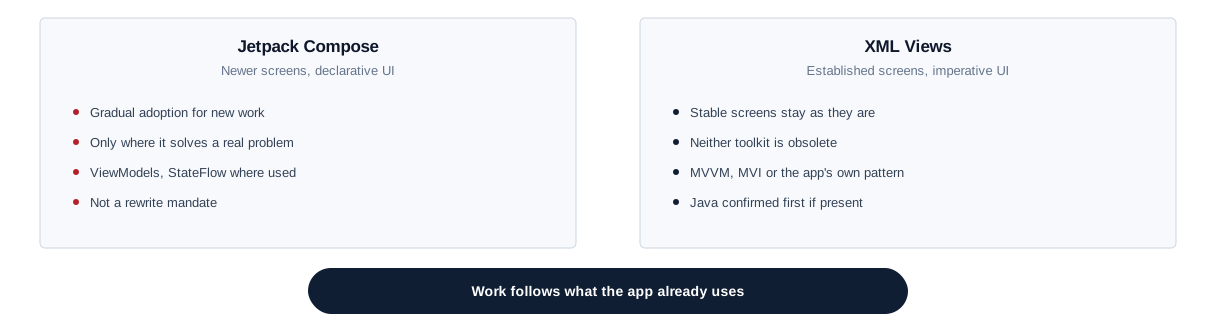
Many Android apps mix Jetpack Compose with older XML layouts and Views. Neither is obsolete, and a stable View-based screen does not need rewriting because Compose exists. Work follows the UI toolkit and architecture the app already uses — MVVM, MVI, a layered approach or a project’s own structure, with ViewModels, StateFlow or other patterns where the app uses them — and gradual adoption of Compose is considered only where it solves a real problem. Older apps sometimes contain Java; tell us if yours does, because substantial Java work is confirmed before we commit.
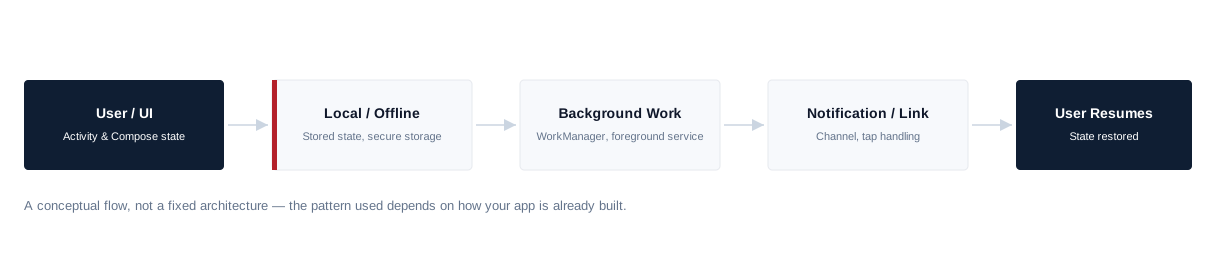
Lifecycle, state and offline behaviour
Android apps must cope with screens being recreated on rotation, processes being killed in the background and users returning hours later. Keeping state predictable through those lifecycle events, handling token refresh, loading and error states and poor connections, and storing sensitive data securely rather than in plain preferences are everyday parts of the role. API responses that do not suit mobile use are raised with your backend team, and changes are coordinated so older installed versions keep working. Identity-provider architecture, single sign-on, backend authentication and security audits are separate pieces of work.
Background work, notifications and app links
Android restricts background activity to protect battery life, the rules tighten with new versions, and some manufacturers add their own battery management on top. Sync, reminders and location updates are built with the approach Android supports for each case — WorkManager, foreground services or scheduled jobs — and feasibility is confirmed before anything is promised, particularly for continuous background location. Notification work covers the runtime permission, notification channels, device tokens and tap handling in the app; the messaging service that sends notifications sits with your backend. App links need verification files hosted on your domain as well as manifest changes, so web or backend involvement is usually required.
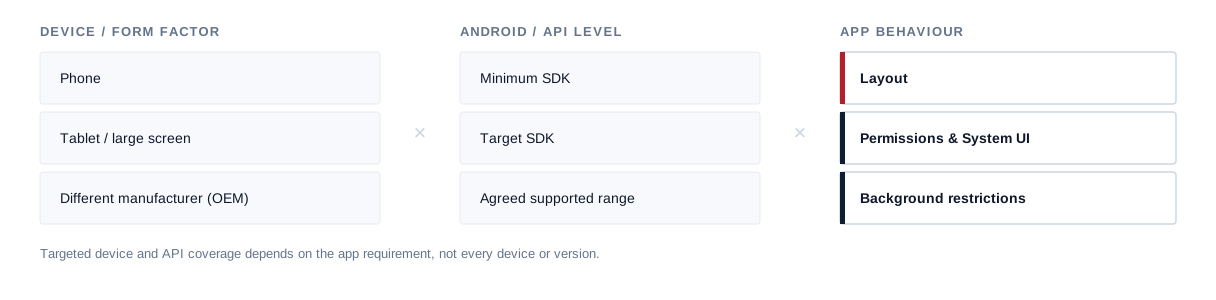
Devices, manufacturers and screen sizes
Behaviour varies between manufacturers, Android versions and low-memory devices, which is why the device and OS range your app supports matters. Changes are checked against that agreed range, using crash and "app not responding" reports to find problems that only appear on certain phones. Emulators are useful, but camera, notifications, biometrics, battery behaviour, manufacturer quirks and performance need physical devices. Tablets and foldables are covered where your app supports them or they are part of the agreed scope.
Performance and memory
Slow Android screens usually come from work on the main thread, heavy lists or images, unnecessary recomposition or layout passes, expensive startup work, or inefficient network and database access. Android Studio’s profilers help find these, along with leaked references and unnecessary background activity. No frame rate, startup time, crash-free rate or battery improvement is promised, because devices, manufacturers, SDKs and backends also play a part.
Platform features and their limits
Camera, media, location, biometrics and document access are common Android work, and existing features can be maintained and extended.
Common Work
Camera, media, location, biometrics, document access — maintained and extended.
Confirmed First
Advanced Bluetooth/IoT, NFC/payment terminals, Android Auto, Wear OS, TV, device-admin/enterprise management, custom hardware, ML/AR features.
Gradle, SDK levels and upgrades
Much Android maintenance is driven by Google Play’s target SDK requirements and by the build toolchain: compileSdk and targetSdk changes, the minimum SDK, Android Gradle Plugin, Gradle and Kotlin versions, Jetpack libraries and vendor SDKs. Routine dependency updates can be part of ongoing work, and abandoned libraries replaced where practical — though some vendor limitations can only be fixed by the vendor. A target SDK bump or toolchain upgrade can bring manifest, permission and background-behaviour changes, dependency replacements and regression testing, so larger upgrades are planned before Play deadlines and agreed separately.
Build variants, signing and Google Play
Build types, product flavours, application IDs, manifests, signing configuration and release app bundles are part of the role, along with fixing build failures. With Play App Signing, Google holds the app-signing key and your team keeps the upload key; keys and the Play Console organisation stay under your control, and keys should not be passed around informally. The developer can prepare releases, manage version codes and names, use internal or closed testing tracks and staged rollouts where your team uses them — watching crash reports during a rollout — and handle technical submission steps and review fixes in your Play Console. Data-safety declarations, policy decisions, listings and release choices remain yours, and approval, review times and policy outcomes are decided by Google, so none is guaranteed. Work follows your existing build and release process; CI/CD architecture and cloud build infrastructure are separate unless agreed.

Tests and accessibility
Existing unit and instrumentation tests are maintained, and focused tests can be added around risky changes. Independent QA, a full device lab and full automated coverage are not included automatically. Accessibility work covers content descriptions, touch targets, text scaling, focus order and checking key flows with TalkBack; formal accessibility audits and conformance testing are separate.
Joining an existing Android app
Onboarding starts with repository and, where needed, Play Console access, then a review of the minimum and target SDK, the Kotlin and Java mix, the Compose and View mix, the architecture, Gradle, Android Gradle Plugin and Kotlin versions, dependencies and vendor SDKs, the API layer, build variants and application IDs, the signing setup, the release process and any analytics or crash reporting in place. A first contained change, built and run on a physical device, confirms the setup before larger work, and upcoming target SDK deadlines are noted for planning. How long this takes depends on the app.
Onboarding sequence
- 01 Repo & Play Console access
- 02 SDK levels & Kotlin/Java mix
- 03 Architecture & dependencies
- 04 Build variants & signing
- 05 Release process & crash reporting
- 06 First contained change
Where the role stops
The developer implements approved designs using Android conventions; UX research, wireframes, visual design and design-system strategy are separate, and UI/UX design capacity can be added if needed. Android developers integrate with your APIs but do not own the backend, database or cloud services. iOS development, product strategy, analytics strategy, DevOps, independent QA and project management are not included automatically.
Developer or Android project?
If you want SAM to design and deliver an Android app as a project rather than add a developer to your team, see our Android app development service or our wider mobile app development service. A dedicated developer suits continuing work your team directs.
Hire an Android developer
Hire a developer for continuing work your team directs.
Android development service
Use the service when you want SAM to deliver the app.
Related
- Hire Dedicated ResourcesOther specialists, and how a dedicated engagement works.
- Android App DevelopmentAn Android app with SAM responsible for delivery.
- Mobile App DevelopmentOur wider mobile app development service.
Our Android experience
Our team has native Android capability through internal and application work. We are not presenting a named public Android case study on this page, and that experience does not by itself mean a particular developer is free on a given date.
Hire Android Developers FAQs
Hire Android Developers
Need Android capacity?
Tell us about your Android app, the Kotlin and Gradle setup it uses and the work waiting in your backlog. We will review the requirement, confirm suitable availability and explain how the engagement could work.


