

SAM Web Studio · Hire Flutter Developers
Hire Flutter Developers for Your Cross-Platform App
Flutter renders its own interface on iOS and Android from a single Dart codebase, which gives teams consistent screens across platforms — and a codebase that needs people who know Dart and Flutter’s widget model well. If your team owns a Flutter app and needs more capacity, we can review what you need and propose a Flutter developer from our team to work in it from your backlog, engaged through SAM Web Studio.
- Dart & Flutter Widgets
- State Management
- Native Plugins
- iOS & Android Builds
- Store Releases

Rated by clients
4.3–5.0across 6 review platforms






When a Flutter developer helps
Teams usually look for Flutter help when the app has grown beyond its original developer, when the product needs more screens and features than the current team can deliver, or when a web or backend team inherits a Flutter app it cannot work on confidently. A dedicated developer suits continuing work where your team sets the priorities and decides what ships. If your app is built with React Native or natively in Swift or Kotlin rather than Flutter, a different specialist is the better fit.
What they work on
Typical work includes new screens and flows, reusable widgets, navigation, forms and validation, data models and API integration, sign-in and account flows inside the app, local storage and caching, permissions, device features such as camera, photos, location and sharing, notification and deep-link handling in the app, package updates, debugging, and iOS or Android build problems in the Flutter project.
Widgets, themes and design fidelity
Because Flutter draws its own UI, custom designs can be reproduced closely — but only if the implementation follows the design system rather than approximating it screen by screen. Shared themes and reusable widgets keep spacing, typography and colours consistent, and layouts are built to adapt to different screen sizes and to platform conventions where your designs call for them. The developer implements approved designs; UX research, wireframes, visual design and design-system strategy are separate, and UI/UX design capacity can be added if you need it.
State management and navigation
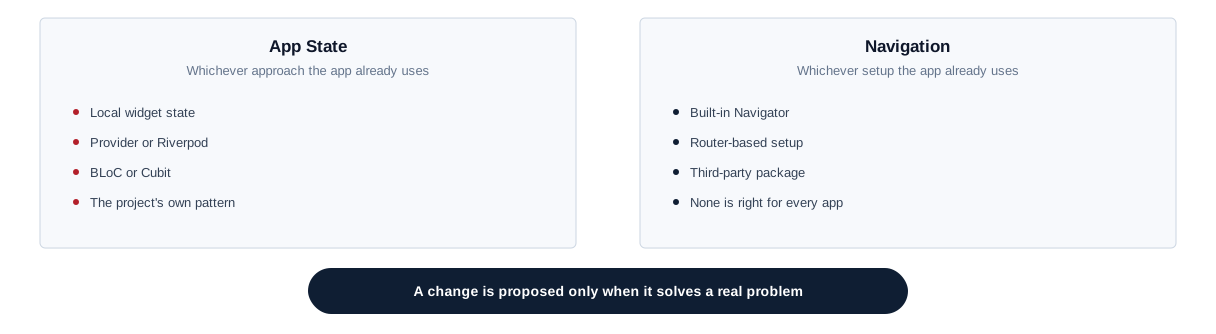
Flutter apps manage state in different ways — local widget state, Provider, Riverpod, BLoC or Cubit, or a project’s own pattern — and navigation may use the built-in Navigator, a router-based setup or a third-party package. None of these is right for every app, and mixing them makes an app hard to maintain. Work follows the approaches your app already uses; a change is proposed only when the current approach is causing real problems, and planned rather than introduced feature by feature.
Packages, plugins and platform channels
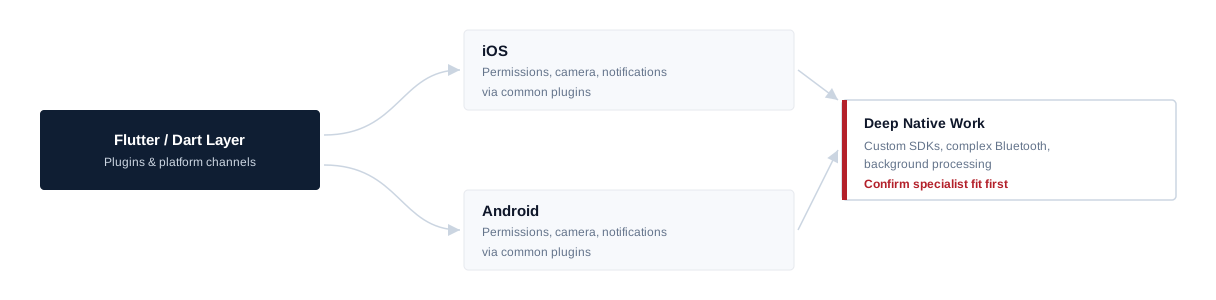
Flutter apps lean heavily on packages, and their quality and maintenance vary. Packages are checked before they are added, kept reasonably current, and abandoned ones replaced before they block a platform update — though some limitations can only be fixed by a package’s maintainers. Where a feature needs native code, Flutter uses plugins and platform channels to reach iOS and Android APIs. Configuring common native plugins, platform permissions and smaller platform-channel changes is part of normal work. Custom native SDK integrations, complex Bluetooth or hardware work and deep background processing are confirmed and scoped separately, and substantial Swift or Kotlin work may suit a native iOS or Android developer better. Flutter’s own platform channels documentation covers the mechanics in detail, for teams who want to see how the bridge works.
iOS and Android are still different
Most Flutter code runs unchanged on both platforms, but not everything behaves the same.
iOS-Side
Permissions, keyboards, notifications, some device integrations, store requirements, and settings in Xcode rather than Dart.
Android-Side
Permissions, background behaviour, keyboards, notifications, some device integrations, store requirements, and settings in Gradle rather than Dart.
The developer handles the common differences and flags early when a feature needs deeper platform work.
Notifications and deep links
App-side notification work covers permission prompts, device tokens, SDK integration where supported, and routing a notification to the right screen. Deep links, universal links and app links also need domain files and platform configuration that often sit with your web or backend team. Sending notifications, the messaging service behind them and delivery itself are outside the Flutter app and not part of this role.
Performance, offline behaviour and real devices
Flutter apps slow down when widgets rebuild more than they need to, long lists build every item at once, oversized images consume memory, or expensive synchronous work runs during startup or scrolling. Flutter’s profiling tools help find these problems in the code paths users actually hit. Apps used on the move also need to handle poor connections: sensible loading and error states, cached data where appropriate, and no lost input when a request fails. Behaviour is checked on representative physical devices, not just simulators and emulators, because performance, permissions, cameras, notifications and app lifecycle often differ. No frame rate, startup time or crash-free rate is promised; devices, plugins and backends also play a part.
Security on the device
Tokens and personal data stored on the device belong in secure storage rather than plain preferences, sensitive data stays out of logs, and API keys should not sit in the app bundle where they could be extracted. These defaults are applied in the code being worked on, and existing weaknesses are flagged. Identity architecture, single sign-on and security audits are separate pieces of work.
Upgrades and native builds
Flutter SDK and Dart upgrades, package updates, iOS deployment targets, CocoaPods and Android Gradle changes tend to arrive together. Routine package updates can be part of ongoing work; larger SDK upgrades that need dependency replacements, native project changes and regression testing are planned in stages and agreed separately. Build issues in Xcode or Gradle, plist and manifest entries, entitlements, signing configuration and build flavours are part of the role; ownership of Apple and Google developer accounts, certificates and team settings stays with you.
Releases and the stores
The developer can prepare release builds for both stores, manage version and build numbers, and help with submission through your App Store Connect and Google Play Console accounts, including fixing technical issues raised in review. Listings, policy decisions and final release choices remain yours, and approval and review times are decided by Apple and Google, so neither is guaranteed. Work happens within your existing build and release process; CI/CD architecture and cloud build infrastructure are separate unless agreed.

Tests and crash reports
Flutter supports unit, widget and integration tests. Existing tests are extended with new features; where coverage is thin, focused tests can start with the flows that would hurt most if they broke, such as sign-in and payments. Checks cover the OS versions and devices agreed for your app, not every Android model. Where the app uses a crash-reporting service, frequent crashes are prioritised and fixes checked in the next release. Independent QA and a full device lab are not included automatically.
Joining an existing Flutter app
Onboarding starts with the Flutter and Dart versions, the iOS and Android projects, package dependencies and native plugins, state management and navigation, the API layer, environments and build flavours, the signing and build process, crash reporting and analytics, and how store accounts are set up. A first contained change, built and run on both platforms, confirms the setup before larger work. Older apps may need dependency updates before new features can be added cleanly; that is planned openly rather than hidden inside feature estimates. How long onboarding takes depends on the app.
Onboarding sequence
- 01 Flutter + Dart versions
- 02 iOS + Android projects
- 03 Packages + native plugins
- 04 State + navigation + API layer
- 05 Environments + flavours + signing
- 06 First contained two-platform change
Where the role stops
Flutter developers integrate with your APIs but do not own the backend; larger backend work sits with a backend developer. Product strategy, cloud infrastructure, DevOps, analytics strategy, independent QA and project management are not included automatically.
Developer or app project?
If you want SAM to design and deliver a Flutter app as a project rather than add a developer to your team, see our Flutter app development service or our wider mobile app development service. A dedicated developer suits continuing work your team directs.
Hire a Flutter developer
Hire a developer for continuing work your team directs.
Flutter development service
Use the service when you want SAM to deliver the app.
Related
- Hire Dedicated ResourcesOther specialists, and how a dedicated engagement works.
- Flutter App DevelopmentA Flutter app with SAM responsible for delivery.
- Mobile App DevelopmentOur wider mobile app development service.
Our Flutter experience
Our team has Flutter capability through internal and application work. We are not presenting a named public Flutter case study on this page, and that experience does not by itself mean a particular developer is free on a given date.
Hire Flutter Developers FAQs
Hire Flutter Developers
Need Flutter capacity?
Tell us about your Flutter app, the platforms and setup it uses, and the work waiting in your backlog. We will review the requirement, confirm suitable availability and explain how the engagement could work.


