

SAM Web Studio · Hire iOS App Developers
Hire iOS App Developers for Native Swift Work
Native iOS apps work directly with Apple’s frameworks, which brings the most direct access to new platform features — and a steady stream of Xcode updates, signing settings, privacy requirements and App Store review rules to keep on top of. When your native iOS app needs more development time than your team has, we can review what you need and propose a Swift developer from our team to work on it from your backlog, engaged through SAM Web Studio.
- Native Swift Work
- UIKit & SwiftUI
- Device Features
- Signing & TestFlight
- App Store Releases

Rated by clients
4.3–5.0across 6 review platforms






When a native iOS developer helps
Teams usually need a native iOS developer when the app relies on platform features that cross-platform frameworks reach less directly, when the iPhone app has its own roadmap, or when an existing Swift app has lost the developer who knew it. A dedicated developer suits continuing work where your team sets the priorities and decides what ships. If your app is built with React Native or Flutter rather than Swift, a React Native or Flutter developer is the natural fit; neither approach is better in every case.
What they work on
Typical work includes new screens and flows in Swift, navigation, forms and validation, API integration, sign-in and account flows, local storage and Keychain use, notifications and deep links, permissions, device features such as camera, photos, location and biometrics, crash fixes, dependency updates, iOS-version compatibility, Xcode build problems and release preparation. iPad layouts are included where your app supports iPad or it is part of the agreed scope.
UIKit, SwiftUI or both
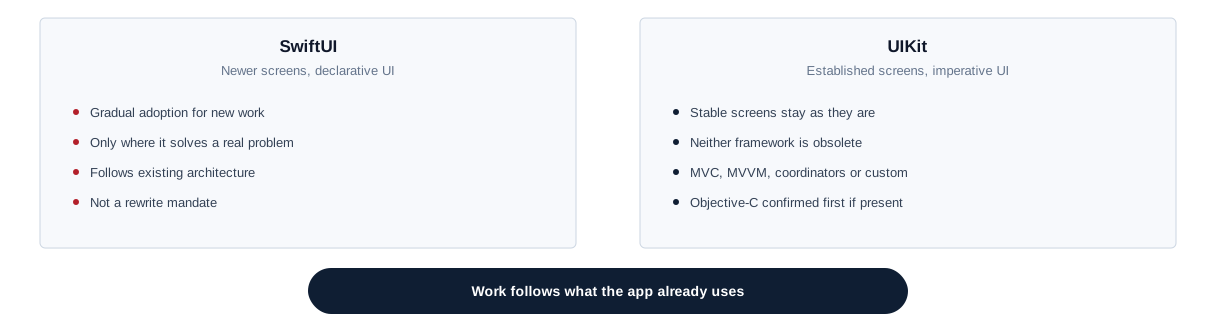
Many apps mix UIKit and SwiftUI, depending on when screens were built. Neither is obsolete, and a stable UIKit screen does not need rewriting because SwiftUI exists. Work follows the framework and architecture the app already uses — MVC, MVVM, coordinators or a project’s own structure — and gradual adoption of SwiftUI is considered only where it solves a real problem. Older projects sometimes contain Objective-C; tell us if yours does, because substantial Objective-C work is confirmed before we commit. Apple’s own SwiftUI documentation covers the framework in detail, for teams who want the mechanics beyond this summary.
Sign-in, data and security on the device
App-side sign-in, registration, token handling and logout are part of the role, with tokens and sensitive data kept in the Keychain rather than plain settings, and biometric unlock where the app supports it. Networking code handles loading and error states and poor connectivity predictably, and clear feedback goes to your backend team when an API response does not suit mobile use. Identity-provider architecture, single sign-on, backend authentication and security audits are separate pieces of work.
Notifications, universal links and background work
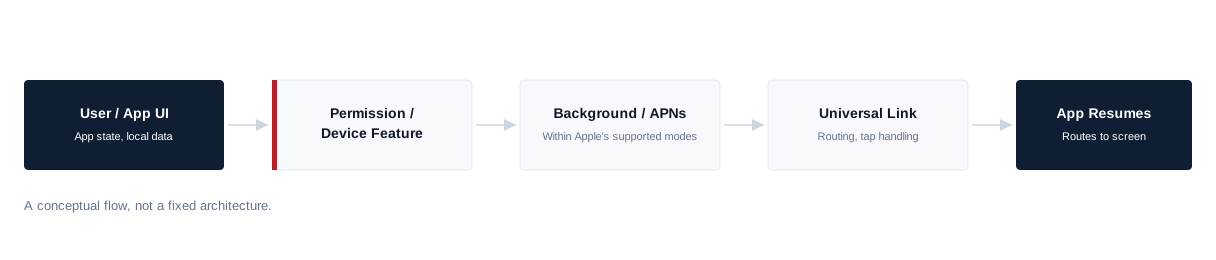
Notification work covers the permission flow, APNs device tokens in the app, and routing a notification to the right screen. Sending notifications and the service behind them sit with your backend. Universal links need the app’s Associated Domains setting and an association file hosted on your website, so web or backend involvement is usually required. iOS strictly limits what apps can do in the background; whether a background task is possible depends on the use case and Apple’s supported modes, so feasibility is confirmed before anything is promised.
Apple platform features
Home-screen widgets, share extensions, actionable notifications, camera, photos, location and document access are common in iOS work. Where your app already uses them, they can be maintained and extended; adding new ones is planned with your team because each has its own review and design considerations.
Common, When Used
Widgets, share extensions, actionable notifications, camera, photos, location, document access.
Specialised, Confirm First
Advanced Bluetooth, HealthKit, HomeKit, ARKit, Core ML, CarPlay, watchOS, custom accessories. In-app purchases and subscriptions depend on the product, Apple’s rules and your backend setup — agreed before implementation, not legal or policy advice.
Privacy, permissions and platform changes
Apple requires apps to explain why they need data such as location, camera or contacts, and to declare how data is used. Permission prompts and privacy declarations are handled carefully, because mistakes here are a common reason for rejected submissions. Each iOS release also brings changes — new permission behaviour, deprecated APIs, updated review guidelines — and planning that work around your release calendar is better than rushing when a deadline arrives.
Performance, memory and real devices
Slow screens usually come from work on the main thread, expensive layout, large images held in memory, long lists or too many state updates. Instruments and Xcode’s debugging tools help find these, along with memory leaks and retain cycles. The simulator is useful, but camera, notifications, biometrics, networking, performance and app lifecycle need checking on physical iPhones — and iPads where supported. No frame rate, launch time, crash-free rate or battery improvement is promised, because devices, SDKs, backends and iOS itself also play a part.
Dependencies, Xcode and iOS upgrades
iOS projects use Swift Package Manager, CocoaPods in older setups, and vendor SDKs whose limitations only the vendor can fix. Dependencies are kept reasonably current and abandoned ones replaced where practical. New Xcode and Swift versions, iOS SDK changes and a higher minimum deployment target can bring deprecated APIs, dependency changes, build-setting updates and regression testing; routine updates are part of ongoing work, and larger upgrades are planned and agreed separately.
Signing, TestFlight and App Store Connect
Much iOS friction sits in the release process. Schemes and configurations, bundle identifiers, capabilities and entitlements, signing settings and provisioning profiles — where access is provided — are part of the role, along with archive and release-build problems. Release builds can be prepared, version and build numbers managed, TestFlight builds distributed within your process, and technical submission steps in App Store Connect handled, including fixing technical issues raised in review. Your Apple developer account, team permissions, certificates that need the account holder, listings and release decisions remain yours. Apple decides approval, review times and entitlement requests, so none of these is guaranteed. Work follows your existing build process; CI/CD architecture and hosted build infrastructure are separate unless agreed.

Testing and crash reports
Existing unit and UI tests are maintained, and focused tests can be added around risky changes. Manual checks cover the iPhone and iPad models and iOS versions agreed for your app rather than every device. Where a crash-reporting service is in place, it is reviewed regularly, frequent crashes are fixed first and fixes checked in the next build. Independent QA, a full device lab and full automated coverage are not included automatically.
Accessibility
iOS has strong accessibility features, but apps must support them. Controls get meaningful VoiceOver labels, text respects Dynamic Type, touch targets are sized sensibly, and key flows are checked with accessibility settings turned on. Formal accessibility audits and conformance testing are separate pieces of work.
Joining an existing iOS app
Onboarding starts with access to the repository and, where needed, your Apple developer team, then a review of the minimum iOS version, Xcode and Swift versions, the UIKit and SwiftUI mix, the architecture, dependencies and package manager, the API layer, environments and configurations, signing, capabilities and bundle identifiers, the TestFlight and release process, and any analytics or crash reporting in place. A first contained change, built and run on a physical device, confirms the setup before larger work, and compatibility risks with upcoming iOS versions are noted. How long this takes depends on the app.
Onboarding sequence
- 01 Repository / access
- 02 iOS / Xcode / Swift versions
- 03 UIKit / SwiftUI / architecture
- 04 Dependencies / API / environments
- 05 Signing / capabilities / release
- 06 First contained device-tested change
Where the role stops
The developer implements approved designs using iOS conventions; UX research, wireframes, visual design and design-system strategy are separate, and UI/UX design capacity can be added if needed. iOS developers integrate with your APIs but do not own the backend, database or cloud services. Android development, product strategy, analytics strategy, DevOps, independent QA and project management are not included automatically.
Developer or iOS project?
If you want SAM to design and deliver an iOS app as a project rather than add a developer to your team, see our iOS app development service or our wider mobile app development service. A dedicated developer suits continuing work your team directs.
Hire an iOS developer
Hire a developer for continuing work your team directs.
iOS development service
Use the service when you want SAM to deliver the app.
Related
- Hire Dedicated ResourcesOther specialists, and how a dedicated engagement works.
- iOS App DevelopmentAn iOS app with SAM responsible for delivery.
- Mobile App DevelopmentOur wider mobile app development service.
Our iOS experience
Our team has native iOS capability through internal and application work. We are not presenting a named public iOS case study on this page, and that experience does not by itself mean a particular developer is free on a given date.
Hire iOS App Developers FAQs
Hire iOS App Developers
Need iOS capacity?
Tell us about your iOS app, the Swift and Xcode setup it uses and the work waiting in your backlog. We will review the requirement, confirm suitable availability and explain how the engagement could work.


