

SAM Web Studio · Hire React Native Developers
Hire React Native Developers for Your iOS and Android App
React Native lets one team maintain an iPhone and Android app from a largely shared codebase — until a platform difference, a native dependency, a library upgrade or a store requirement gets in the way. If your team owns a React Native app and the backlog keeps growing, we can review what you need and propose a developer from our team to take on part of it, engaged through SAM Web Studio.
- React Native Work
- Shared & Native Code
- Expo & Bare Projects
- iOS & Android Builds
- Store Releases

Rated by clients
4.3–5.0across 6 review platforms






When a React Native developer helps
Teams usually need React Native help when the feature list is growing faster than the team, when the original developer has moved on, or when a web team that knows React needs someone who understands the mobile side: navigation, permissions, offline behaviour, native builds and store releases. A dedicated developer suits continuing work where your team sets the priorities and decides what ships.
What they work on
Typical work includes new screens and flows, reusable components, navigation, forms and validation, API integration, sign-in and account flows inside the app, local storage, permissions, device features such as camera, photos, location and sharing, push-notification and deep-link handling in the app, debugging, dependency updates, and iOS or Android build problems in the React Native project.
React Native, native, or both?
Most of a React Native app is shared between platforms, but not all of it. Permissions, keyboard and layout behaviour, background work and some libraries behave differently on iOS and Android, and some features need platform-specific configuration or native SDKs. How much code is shared depends on the app. A React Native developer handles the common platform differences; where a feature needs substantial Swift, Objective-C, Kotlin or Java work, we confirm fit first, and a native iOS or Android developer may be the better addition. If your app is built with Flutter rather than React Native, that is a different framework and a different specialist.
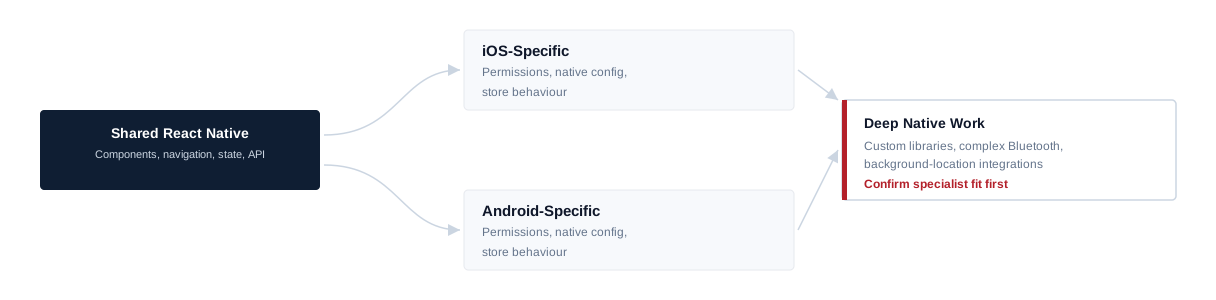
Expo, bare projects and native modules
React Native apps are set up in different ways: with Expo’s managed tooling, with Expo plus generated native projects, or as a traditional bare project with its own Xcode and Gradle setup. Expo does not mean “no native code”, and a bare project does not mean everything is custom. The developer works within the setup your app already uses. Common native modules and smaller native changes — permissions, plist and manifest entries, configuring an SDK — are part of normal work; building a custom native library from scratch, or complex Bluetooth, background-location or hardware integrations, is confirmed and scoped separately. React Native’s own native platform documentation covers how native modules connect to the JavaScript layer, for teams who want the mechanics in more detail.
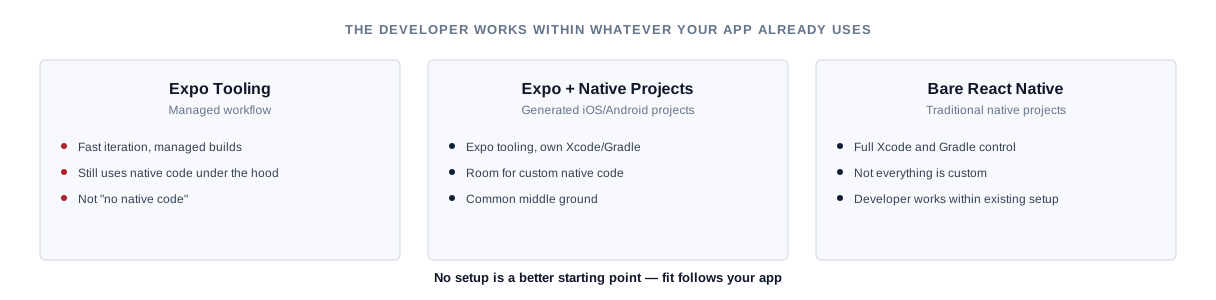
App structure and state
As apps grow, where data lives and how screens stay in sync becomes the main source of bugs. Apps use different approaches — component state, context, a store such as Redux, or a server-state library — and none is right for every app. Work follows the navigation and state-management approach your app already uses, with server data and local state kept clearly separated, and the approach itself is questioned only when it is causing real problems.
Offline, performance and real devices
Mobile users lose connection in lifts, trains and basements, so the app should show sensible states when offline, keep data users have entered and recover cleanly when the connection returns. Performance problems show up the same way: an app that feels smooth in the simulator or on a new phone can stutter on an older Android device. Long lists, heavy images, unnecessary re-renders, expensive JavaScript on startup and animation work are checked on representative physical devices and the causes fixed in the app. No frame rate, startup time or crash-free rate is promised, because devices, SDKs and backends also play a part.
Notifications and deep links
Notifications and links that open specific screens involve the app, both platforms’ services and your backend. They break easily after upgrades or configuration changes. App-side work covers permission prompts, device tokens, handling and routing notifications, and opening the right screen from a link. Sending notifications, the messaging service behind them, and the domain and web files needed for universal links and app links usually involve your backend and web teams, and delivery is ultimately controlled by Apple and Google.
Security on the device
Tokens, personal data and payment details need careful handling on phones that can be lost or shared. That means secure storage rather than plain storage, no sensitive data in logs, and secrets kept out of the app bundle where they could be extracted. Designing identity architecture, single sign-on or security audits are separate pieces of work.
Upgrades and native builds
React Native apps depend on the framework, React, a navigation library and many third-party packages, plus CocoaPods on iOS and Gradle on Android. Routine package updates can be part of ongoing work. Moving across several React Native versions — or adopting newer architecture options — can involve native build changes, dependency replacements and regression testing, so it is planned in stages and agreed separately rather than assumed necessary. Build problems in Xcode or Gradle, entitlements, signing configuration and manifest issues are part of the role; ownership of Apple and Google developer accounts, certificates and team settings stays with you.
Releases and the stores
The developer can prepare release builds, manage version and build numbers, and help with submission through your App Store Connect and Google Play Console accounts, including fixing technical issues raised in review. Store listings, policy decisions and final release choices remain yours. Approval and review times are decided by Apple and Google, so no approval or timeline is guaranteed. Work happens within your existing build and release process; setting up CI/CD or cloud build infrastructure is separate unless agreed.

Testing and crash reports
Existing tests are maintained and focused ones added around risky changes. Behaviour is checked on both platforms against the OS versions and devices agreed for your app — no one can test every Android model — and device-specific issues are investigated when they appear. Where your app uses a crash-reporting service, it is reviewed regularly, the most frequent crashes fixed first, and fixes checked in the next release. Independent QA and a full device test lab are not included automatically.
Joining an existing app
Onboarding starts with the React Native version, whether the app uses Expo or a bare setup, the iOS and Android projects, navigation, state management, the API layer, native dependencies, environment configuration, the signing and build process, and any analytics or crash reporting already in place. A first contained change, built and run on both platforms, confirms the setup before larger work, and upgrade or dependency risks are noted for your team’s planning. How long this takes depends on the app and the state of its native projects.
Onboarding sequence
- 01 React Native version + setup
- 02 Expo / bare + native projects
- 03 Navigation + state
- 04 API + native dependencies
- 05 Environment + signing + build
- 06 First contained two-platform change
Where the role stops
The developer implements approved screens and interactions; UX research, wireframes, visual design and design-system ownership are separate, as is UI/UX design capacity if you need it. React Native developers integrate with your APIs but do not own the backend; larger backend work sits with a backend developer. Product strategy, cloud infrastructure, DevOps, independent QA and project management are not included automatically.
Developer or app project?
If you want SAM to design and deliver a React Native app as a project, rather than add a developer to your team, see our React Native app development service, or our wider mobile app development service. A dedicated developer suits continuing work your team directs.
Hire a React Native developer
Hire a developer for continuing work your team directs.
React Native development service
Use the service when you want SAM to deliver the app.
Related
- Hire Dedicated ResourcesOther specialists, and how a dedicated engagement works.
- React Native App DevelopmentA React Native app with SAM responsible for delivery.
- Mobile App DevelopmentOur wider mobile app development service.
Our React Native experience
Our team builds cross-platform apps as part of our mobile and application work. We are not presenting a named public React Native case study on this page, and that experience does not by itself mean a particular developer is free on a given date.
Hire React Native Developers FAQs
Hire React Native Developers
Need React Native capacity?
Tell us about your React Native app, the platforms and setup it uses, and the work waiting in your backlog. We will review the requirement, confirm suitable availability and explain how the engagement could work.


