

SAM Web Studio · Hire Shopify Developers
Hire Shopify Developers for Ongoing Store and Theme Work
A Shopify store is never finished: new collections, seasonal campaigns, app changes, theme tweaks and the occasional fault that appears after an app update. If your ecommerce team runs the store and needs development capacity for that steady flow of changes, we can review what you need and propose a Shopify developer from our team to work alongside you, engaged through SAM Web Studio.
- Liquid & Section Work
- App Configuration
- Collections & Metafields
- Checkout Boundaries
- Trading-Calendar Releases

Rated by clients
4.3–5.0across 6 review platforms






When a Shopify developer helps
Stores usually need dedicated development help when the merchandising team keeps asking for layouts the theme cannot do, when apps have accumulated and started to conflict, or when every small change waits in an agency queue. A dedicated developer suits continuing store work where your team sets the priorities and approves what goes live.
Configure, customise or rebuild
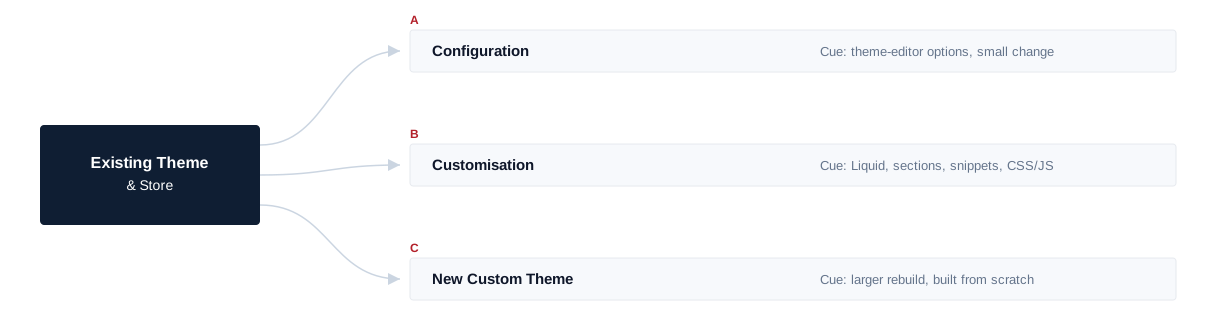
Most Shopify work falls into one of three levels, and it helps to be clear which one a request needs. Configuration uses the options your theme already offers in the theme editor. Customisation changes the theme itself — Liquid templates, sections, snippets, CSS and JavaScript — to add layouts or behaviour the settings cannot. A new custom theme, built largely from scratch, is a much bigger decision. Configuration and customisation are the normal scope of a dedicated developer; a new theme is scoped as a project rather than assumed.
Theme work in practice
Liquid is Shopify’s templating language: it controls what the storefront shows, not how the store’s back office works. On themes built for Shopify’s sections-everywhere model, much of the useful work is creating sections and blocks with sensible settings, so merchandisers can build landing pages, banners and collection layouts in the theme editor without breaking them. Older or heavily modified themes behave differently, so the approach depends on the theme and how it has been changed. Customisations are recorded and, where practical, kept separate from the theme’s own code, so future theme updates remain manageable. Shopify’s own Liquid reference documents the tags, filters and objects themes are built from, for teams who want the mechanics in more detail.
Collections, products and store content
Much store work is about helping customers find and choose products: collection layouts, filters, product-page information, variant presentation and cross-sells. Metafields and metaobjects, where the store uses them, let structured product and content data appear consistently across templates. The developer builds the templates and structures; entering large product catalogues, writing product copy, photography and merchandising decisions stay with your team unless agreed separately.
Apps and integrations
Apps solve problems quickly, but each adds scripts, cost and possible conflicts. App work covers evaluating and configuring apps, making the theme-side changes an app needs, and tracking down conflicts between apps and the theme. Some behaviour is controlled by the app vendor and can only be changed by them, and app subscriptions remain your cost. Building custom Shopify apps — embedded or public apps, Admin API integrations, Shopify Functions or webhook-driven backend services — is separate development work, as are larger custom integrations with inventory, accounting or ERP systems.
Checkout, payments and shipping
Shopify controls much of the checkout, and what can be changed depends on your plan, the checkout features Shopify currently offers and the apps available. The developer works within those limits — checkout settings, supported customisation points and apps — and we confirm what is technically possible for your store before committing to a change, rather than attempting fragile workarounds.
Payment and shipping work covers configuring supported providers, rates and apps.
Within Scope
Checkout settings, supported customisation points and apps; supported payment and shipping provider configuration.
Not Offered
Custom payment gateways, custom shipping logic outside Shopify’s supported options, Shopify Plus–specific checkout work.
Speed and app weight
Each app can add scripts to every page, and stores slow down gradually as apps, tracking tags and theme features accumulate. The developer can identify which apps, embeds and theme code cost the most loading time, remove leftovers from uninstalled apps, and improve image and script loading at storefront level. Some weight comes from the platform or from apps your business needs, so no PageSpeed score, Core Web Vitals result or conversion uplift is promised.
Search implementation and design
A Shopify developer can implement technical search requirements at theme level — title and description templates, structured data, redirects, collection and product template structure and image fixes — as your SEO owner specifies. Keyword research, SEO strategy, content and link building are not part of this role. Storefront designs are implemented from approved designs; UX research, branding and conversion strategy are separate.
Working to your trading calendar
Ecommerce work follows a calendar: launches, sales and seasonal campaigns. Larger changes are prepared on an unpublished copy of the theme, previewed on mobile and desktop, and published away from promotions and peak trading, when a broken theme costs sales. Where your team uses version control for themes, work follows that workflow; many stores do not, and that is fine. Your team sets the priorities; you are told what is realistic before a deadline, not after.
Store migrations
Moving to Shopify from another platform, or between Shopify themes, involves several separate pieces: the theme or design, product, customer and order data, URL redirects, replacing apps and plugins, payment and shipping setup, and the domain cutover. A dedicated developer can take on parts of this within an agreed plan, but a full platform migration is usually better scoped as a project, with search-visibility planning handled alongside it.
Joining an existing store
Onboarding starts with collaborator or staff access with appropriate permissions, then a review of the Shopify plan, the theme and its version, any custom code, installed apps and app embeds, the product and collection structure, metafields in use, checkout and payment setup, and analytics and tracking. A first contained change — a new section, or a fix to a known fault — confirms the workflow before larger work, and any app conflicts or leftovers found along the way are listed for your team. How long this takes depends on how much the store has been customised.
Onboarding sequence
- 01 Plan & access
- 02 Theme + version
- 03 Apps & embeds
- 04 Collections & metafields
- 05 Checkout & payment setup
- 06 First contained change
Access and boundaries
Access should use individual staff or collaborator accounts with only the permissions the work needs, rather than shared logins. Security audits, penetration testing and PCI compliance ownership are not part of this role. Independent QA, project management, UX and branding are not included automatically.
Developer or Shopify project?
If you want SAM to set up, rebuild or migrate a store as a project rather than add a developer to your team, see our Shopify development service. A dedicated developer suits continuing store work your team directs.
Hire a Shopify developer
Hire a developer for continuing store work your team directs.
Shopify development service
Use the service for a store build, rebuild or migration.
Related
- Hire Dedicated ResourcesOther specialists, and how a dedicated engagement works.
- Shopify DevelopmentA store build, rebuild or migration with SAM responsible for delivery.
Shopify work we have delivered
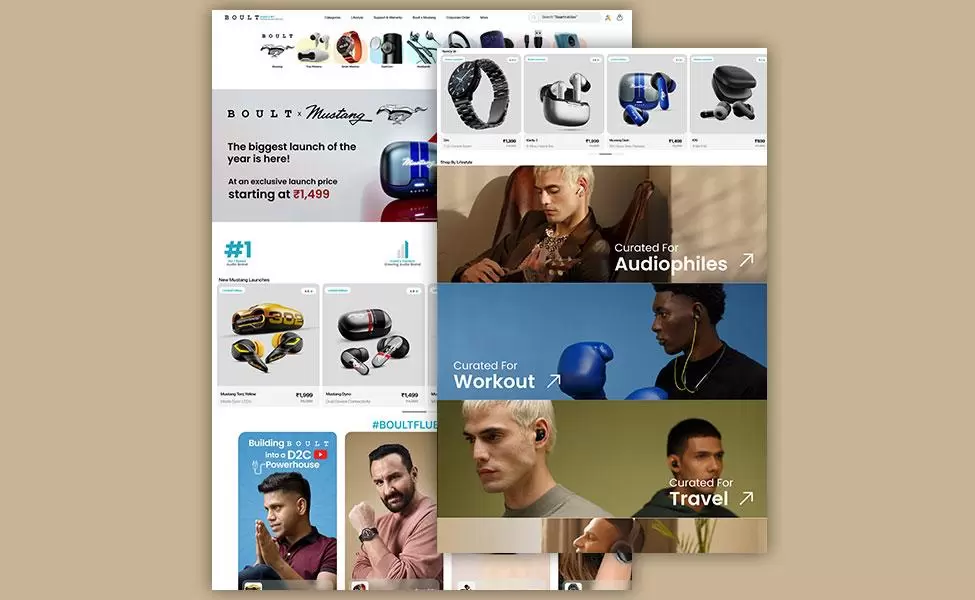
Our Shopify work includes Melko, an Australian fashion and accessories retailer, where we handled theme setup, theme customisation and complete store work, and — historically — the Boult Audio store we built in 2020. These were project builds, not dedicated-resource placements; they show the Shopify work our team understands, not who is free on a given date.

Shopify · Project build
Melko
The screenshot shows Melko, an Australian fashion and accessories retailer, with theme setup, theme customisation and complete store work handled by our team on Shopify.
Also on Shopify, historically (2020) Boult Audio, now at goboult.co.in
Hire Shopify Developers FAQs
Hire Shopify Developers
Need Shopify capacity?
Tell us about your Shopify store, the theme and apps it uses, and the work you need help with. We will review the requirement, confirm suitable availability and explain how the engagement could work.


