

SAM Web Studio · Hire UI/UX Designers
Hire UI/UX Designers for Your Product Team
Many product teams have more development capacity than design capacity. Developers end up guessing at layouts, forms ask for more than they need, and every new feature looks slightly different from the last. If your team already has a product, website or app in progress and needs design capacity inside your workflow, we can review what you need and propose a UI/UX designer from our team to work with your product owner and developers, engaged through SAM Web Studio.
- UX Flows & Structure
- UI & Components
- Prototypes
- Design Systems
- Developer Handoff

Rated by clients
4.3–5.0across 6 review platforms






When a dedicated designer helps
Teams usually bring in design help when features are being built without designs, when the product has drifted into inconsistent patterns, when developers keep waiting on design decisions, or when a redesign is planned but nobody owns the detail. A dedicated designer suits continuing product work where your team keeps the priorities, the roadmap and the final say on trade-offs; the designer brings options and the reasoning behind them.
The work itself
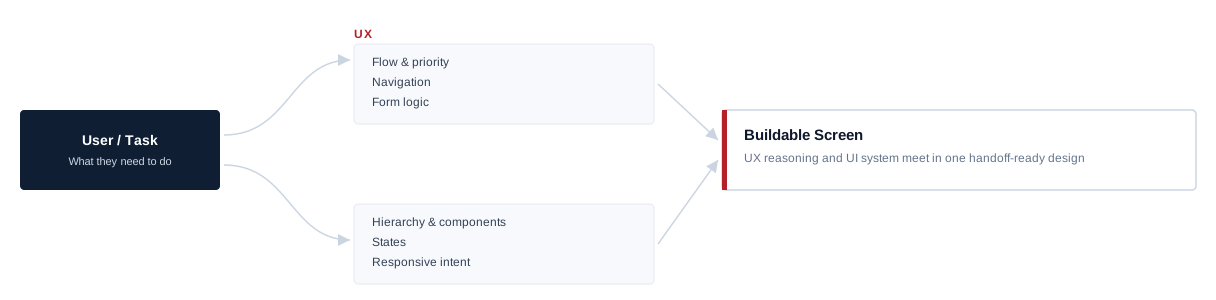
In practice the work spans both halves of the job. On the UX side: mapping user flows, deciding what each screen needs to show and in what order, simplifying forms and multi-step processes, and structuring navigation. On the UI side: layout, typography, spacing, component states and the visual hierarchy that tells people what matters. Typical outputs are flows, wireframes, interface designs for web and mobile, clickable prototypes and handoff files developers can build from — including the empty, loading and error states that are easy to forget.
As much exploration as the task needs
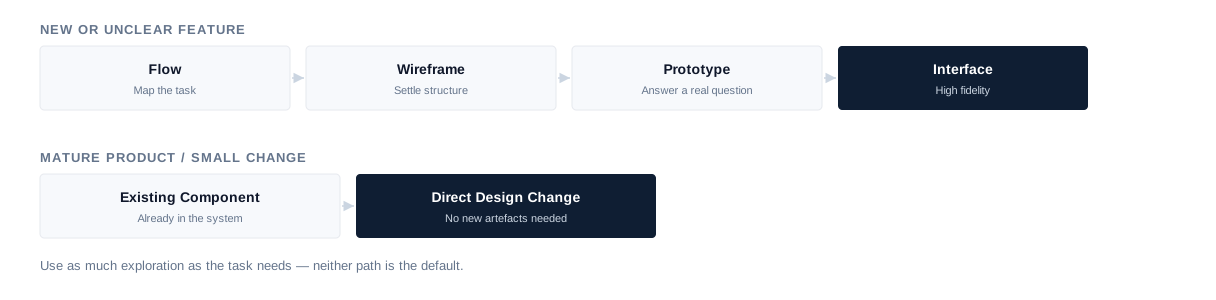
Not every piece of work needs the full sequence of flows, low-fidelity wireframes and high-fidelity screens. A new feature with unclear requirements benefits from wireframes that settle structure before anyone discusses colour. A small change in a mature product is often better designed directly in the existing components. Prototypes are used where a flow needs to be seen to be understood — for stakeholder review or to answer developers’ questions — not for every screen, and they are design artefacts, not production code.
Starting from what you already know
Good design decisions rest on evidence about users: support tickets, sales feedback, analytics, recordings or heatmaps where you have them, interviews your team has already run, and what customers say about competitors. That material is the starting point, and more is asked for where it is thin. Where the engagement includes it, the designer can plan and run small, focused checks — showing a prototype to a handful of your users and watching where they hesitate. Recruiting research participants, large studies, quantitative research and formal research programmes are separate undertakings and are not assumed.
Forms, workflows and data-heavy screens
Much of the valuable work is unglamorous: long forms that ask too much, multi-step processes where people get lost, settings and permissions, and error messages that say what went wrong without saying how to fix it. Business products also need screens full of numbers, tables and filters, where the job is deciding what matters most, how data is grouped and how the screen behaves with too much or too little of it — decisions developers should not have to make alone. Designing with realistic content from the start, including long names, missing values and translated labels, keeps screens from breaking when real data arrives.
Working within your design system
Inconsistency is expensive: every slightly different button or form is another thing to build and test. Where your product has a design system or component library, new work uses and extends it, and gaps are documented so the system improves as features are added. Where there is no system yet, a small set of shared components and rules can be established as part of the work. A full design-system programme — tokens across several products, governance, and the coded component library itself — is a larger piece of work, scoped separately.
Websites, apps and screen sizes
The designer defines responsive intent — how key layouts adapt between desktop, tablet and mobile, and what changes at each stage — rather than handing over a desktop design and leaving developers to guess. Not every breakpoint is drawn separately; developers implement the final responsive behaviour with the designer answering questions. For mobile apps, shared product patterns are balanced with iOS and Android conventions where they matter, so the product feels at home on each platform without becoming two different apps.
Accessibility-aware design
Contrast, readable type, clear focus states, labelled controls, sensible touch targets and forms that explain themselves are easier to design in than to retrofit, so they are part of normal design work, with notes on semantics and keyboard or screen-reader behaviour in the handoff where relevant. Formal accessibility audits, conformance testing and compliance sign-off are separate pieces of work.
Handoff and working with developers
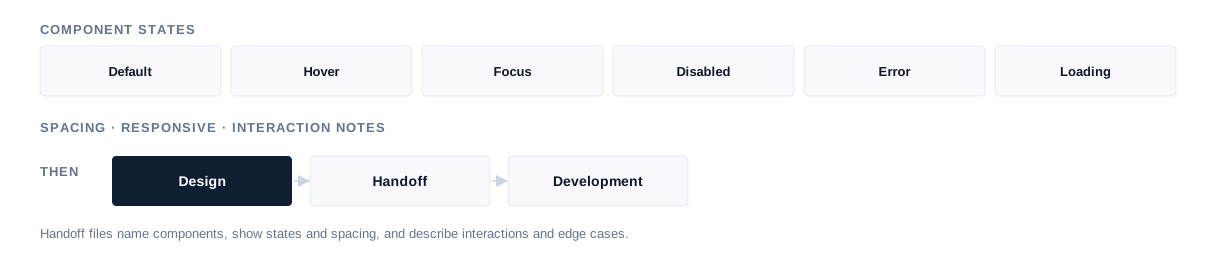
A design is only useful if developers can build it without guessing. Handoff files name components, show states and spacing, describe interactions and edge cases, and are kept in the tools your team already uses. The designer stays available during build, adjusts designs when technical constraints require it, and — where the engagement includes it — reviews implemented screens for visual and interaction fidelity, focusing on differences that affect usability. Writing production code, functional QA and browser or device testing remain with your developers and testers.
What this role is not
UI/UX design sits next to several other disciplines without replacing them. Unclear labels can be flagged, with suggestions for shorter interface text and where content should sit, but full website copy, SEO content and brand messaging are separate. Logos, brand identity and campaign graphics belong to brand and graphic design. Product strategy, market research, analytics implementation, A/B testing programmes and frontend development are not included automatically. Design can remove friction and make important actions easier to understand, but conversion, engagement and revenue depend on traffic, offer, content, product and implementation, so no improvement is promised.
Joining an existing product
Onboarding starts with the product itself, the current design files, any design system or component library, brand guidelines, who the users are, available analytics and support feedback, existing research, the roadmap, and the constraints your developers work within. A first contained piece of work — one feature’s flow, or a known problem screen — sets working habits before larger tasks, and inconsistencies spotted along the way are listed for your team to prioritise. How long this takes depends on the size and state of the product.
Onboarding sequence
- 01 Product + existing files
- 02 Design system / components
- 03 Brand + users
- 04 Analytics / feedback / research
- 05 Roadmap + developer constraints
- 06 First contained design task
Designer or design project?
If you want SAM to own a defined design project — research synthesis, flows, interface and prototype for a product or redesign — rather than add a designer to your team, see our UI/UX design service. For a full website design project, see website design. A dedicated designer suits continuing work your team directs.
Hire a UI/UX designer
Hire a designer for continuing work your team directs.
UI/UX design service
Use the service when you want SAM to own a defined design project.
Related
- Hire Dedicated ResourcesOther specialists, and how a dedicated engagement works.
- UI/UX DesignA defined design project with SAM responsible for delivery.
Our design experience
Our design team works across websites, applications and digital products, supporting user flows, interface structure, responsive behaviour, component systems and developer handoff as part of our broader design and development work. This reflects our design capability and delivery experience. It does not imply that a particular designer is available at a given time; suitable availability is confirmed against the requirement.
Hire UI/UX Designers FAQs
Hire UI/UX Designers
Need design capacity?
Tell us what you are designing, what already exists and where your team needs design capacity. We will review the requirement, confirm suitable availability and explain how the engagement could work.


