

SAM Web Studio · Hire WordPress Developers
Hire WordPress Developers for Ongoing Site and Theme Work
WordPress is easy to start and surprisingly easy to make messy: overlapping plugins, page-builder layouts nobody can edit safely, themes modified directly until the next update undoes the work. If you run WordPress sites — your own or your clients’ — and need more development capacity, we can review what you need and propose a WordPress developer from our team to work within your process, engaged through SAM Web Studio.
- Theme & Template Work
- Block Editor & Builders
- Plugin Configuration
- Content Structure (CPTs)
- Updates & Staging

Rated by clients
4.3–5.0across 6 review platforms






When a WordPress developer helps
The most common cases are marketing teams whose site changes every week, agencies with more WordPress builds than developers, and businesses running several WordPress sites with nobody technically responsible for them. A dedicated developer suits a steady stream of work your team directs: new templates and sections, plugin problems, updates, fixes and changes that are too technical for editors but too small for a separate project. The same applies when a previous developer or agency is no longer reachable and site documentation is thin.
Themes: modify, extend or build
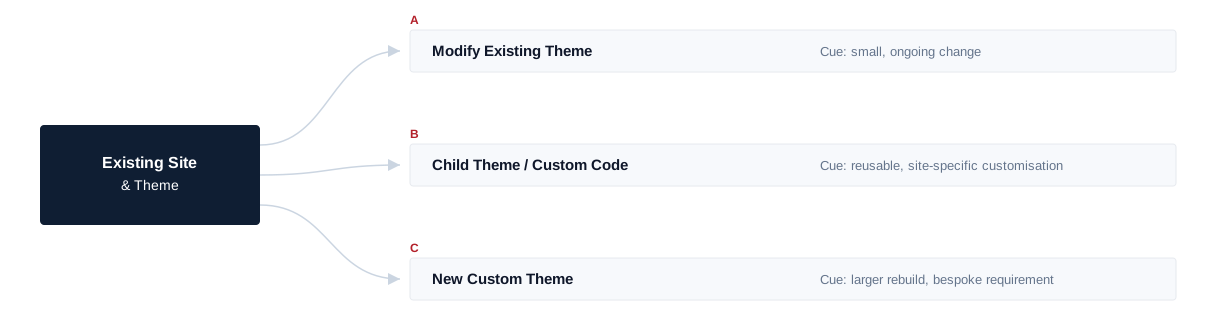
Most WordPress work happens inside an existing theme — adjusting templates, adding sections, or moving customisations into a child theme so updates stop overwriting them. Building a new custom theme from scratch is a larger decision; it can be done where the requirement justifies it, but it is not assumed as part of ongoing work. Changes are made in child themes or your own custom code rather than in third-party theme or plugin files. WordPress’s own documentation on child themes sets out how the parent-and-child relationship works, for teams who want the mechanics in more detail.
Block editor and page builders
WordPress sites are built in very different ways: with the block editor and custom blocks or patterns, or with page builders such as Elementor. The developer works with the editor or builder your site already uses, and tells you honestly when a builder-based layout has become a maintenance problem. We do not claim equal experience with every builder or premium theme framework, so tell us what your site uses and we will confirm fit.
Content structure your editors can use
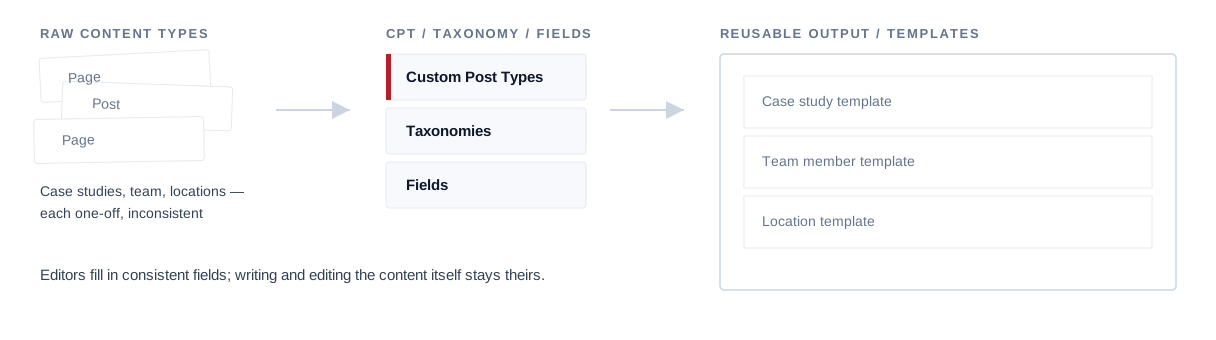
Many sites outgrow simple pages and posts: case studies, team members, locations, products or events each need their own structure. Custom post types, taxonomies and fields let content be entered once in a consistent format and shown correctly wherever it appears. Good templates are part of the job too — a site your marketing team can update without asking a developer every time. Writing and editing the content itself is not part of this role.
Plugins: fewer, better chosen
Many WordPress problems come from plugins: too many of them, overlapping ones, abandoned ones, or heavy ones doing something a few lines of code could do. Plugin work includes installing and configuring what you need, resolving conflicts, extending behaviour through hooks and filters where appropriate, and checking what each plugin actually contributes so ones that add risk without value can be replaced or removed. Building and maintaining commercial plugins as products is a different kind of work and is not part of this role, and some plugin limitations can only be solved by the plugin’s vendor.
Forms and integrations
Contact forms, quote requests and newsletter sign-ups are how many WordPress sites earn their keep. Forms should deliver reliably, reach the right inbox or CRM, resist spam, and make failures visible where possible rather than failing silently when an integration breaks. Integrations beyond what existing plugins or a reasonable amount of custom code can handle are scoped separately.
WooCommerce stores
Where your site sells through WooCommerce, the developer can work on product and catalogue templates, store settings, checkout adjustments within WooCommerce’s supported options, payment and shipping configuration through supported extensions, and extension conflicts. Stores add risk to every change, so the purchase path is checked after updates.
Custom payment gateways, ERP integrations, complex subscription or marketplace setups, headless commerce and custom WooCommerce extensions are separate pieces of work.
Updates and compatibility
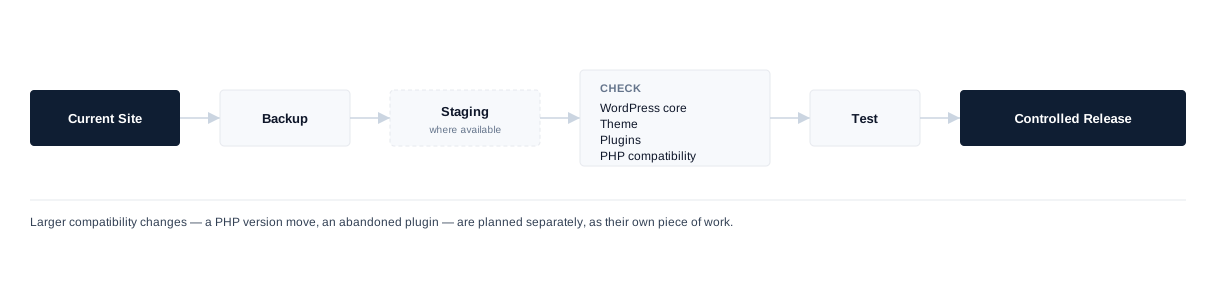
WordPress core, themes and plugins release updates constantly, and skipping them builds up risk. Not every update is safe to apply blindly: an update can conflict with a plugin, a customised theme or the PHP version on your hosting. Updates are applied in a controlled way — backup first, testing on a staging copy where one exists, one change at a time when something looks risky — to reduce the chance of an update breaking the site on a busy day. Larger compatibility work, such as moving to a newer PHP version or replacing an abandoned plugin, is planned separately.
Staging, backups and deployment
Changing a live WordPress site directly is where many accidents happen. Where your hosting supports it, changes are made on a staging copy and moved to the live site once tested; where it does not, a backup is taken before each change and changes are made at quieter times. Work follows your existing deployment process; server administration, DNS, CDN setup, email hosting and server security are not part of this role.
Speed within WordPress
Many WordPress sites are slow because of heavy themes, too many plugins, unoptimised images, uncached pages and third-party scripts. The developer can reduce what each page loads and fix caching and database problems at the WordPress level, and will tell you when the hosting itself is the limit. No PageSpeed score or Core Web Vitals result is promised; server and CDN work is covered by our hosting and infrastructure service or your own host.
Security basics
WordPress compromises commonly come from outdated plugins, weak admin passwords, unused plugins and themes left installed, and unprotected forms or uploads. Routine work removes what is not needed, keeps what remains updated, uses individual accounts with only the access each person needs, and adds sensible protection to forms and admin access. Cleaning up a hacked site, security audits and penetration testing are separate pieces of work, covered by our security and performance service.
WordPress-Level Performance
- Heavy themes
- Too many plugins
- Unoptimised images
- Uncached pages
- Third-party scripts
Server and CDN work sits outside this role.
Routine Security Hygiene
- Remove unused plugins/themes
- Individual, least-privilege accounts
- Keep what remains updated
- Protect forms & admin access
Hacked-site cleanup, audits and penetration testing are separate work.
SEO implementation, not SEO ownership
WordPress developers often implement search requirements: metadata fields, SEO plugin and sitemap configuration, redirects, canonical tags, schema placement and template structure. These are carried out as your SEO owner specifies.
Implement
Metadata fields, SEO plugin and sitemap configuration, redirects, canonical tags, schema placement, template structure.
Not Owned Here
Keyword research, SEO strategy, content and link building.
Working with agencies
Partner-Delivered WordPress Experience
Agencies often need WordPress capacity that follows their own standards. The developer can build to your designs and conventions, in your repositories and project tools, with your team managing the client relationship. Several of our WordPress builds were delivered through a partner agency in Ireland in exactly this way. How client-facing communication, branding and confidentiality are handled is agreed in the engagement terms rather than assumed.
Client communication, branding and confidentiality — agreed per engagement.
Joining an existing WordPress site
Onboarding starts with the WordPress and PHP versions, the theme and whether it has a child theme, the active plugins, the editor or builder, any custom code, existing integrations, the hosting and deployment setup, and whether staging and backups exist. A first contained change — a template fix or a plugin conflict — confirms access and conventions before larger work, and risks spotted along the way are listed for your team to prioritise. How long this takes depends on how the site was built.
Onboarding sequence
- 01 WordPress / PHP version
- 02 Theme + child theme
- 03 Plugins / builder
- 04 Custom code / integrations
- 05 Hosting / staging / backups
- 06 First contained change
Developer or WordPress project?
If you want SAM to deliver a WordPress site as a project — design, build and launch — rather than add a developer to your team, see our WordPress development service. A dedicated developer suits continuing work your team directs. Design, branding, UX, independent QA, project management and paid plugin or theme licences are not included automatically.
Hire a WordPress developer
Hire a developer for continuing work your team directs.
WordPress development service
Use the service when you want SAM to own delivery.
Related
- Hire Dedicated ResourcesOther specialists, and how a dedicated engagement works.
- WordPress DevelopmentA WordPress site with SAM responsible for delivery.
WordPress work we have delivered
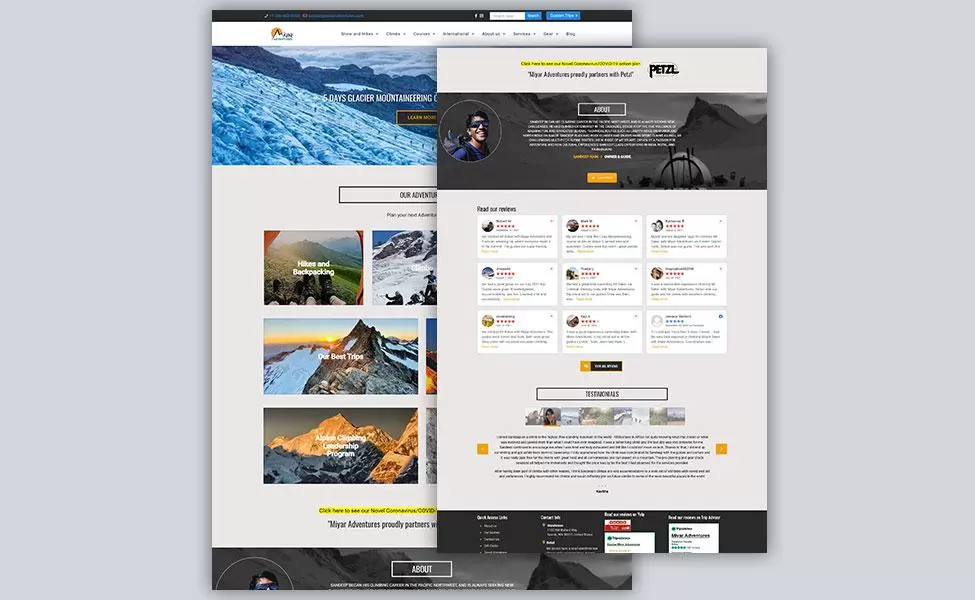
Our WordPress work includes Miyar Adventures, a Seattle adventure and guiding site we built directly, and sites delivered through a partner agency for SEQ Safety Consulting, Greenville Procurement Partners and Freestyle Traveling. These were project builds, not dedicated-resource placements; they show the range of WordPress work our team handles, not who is free on a given date.
WordPress · Project build
Miyar Adventures
The screenshot shows Miyar Adventures, a Seattle adventure and guiding website built directly by our team on WordPress.
Also on WordPress, delivered through a partner agency SEQ Safety Consulting · Greenville Procurement Partners · Freestyle Traveling
Hire WordPress Developers FAQs
Hire WordPress Developers
Need WordPress capacity?
Tell us about your WordPress site, the theme or builder it uses and the work you need help with. We will review the requirement, confirm suitable availability and explain how the engagement could work.


