





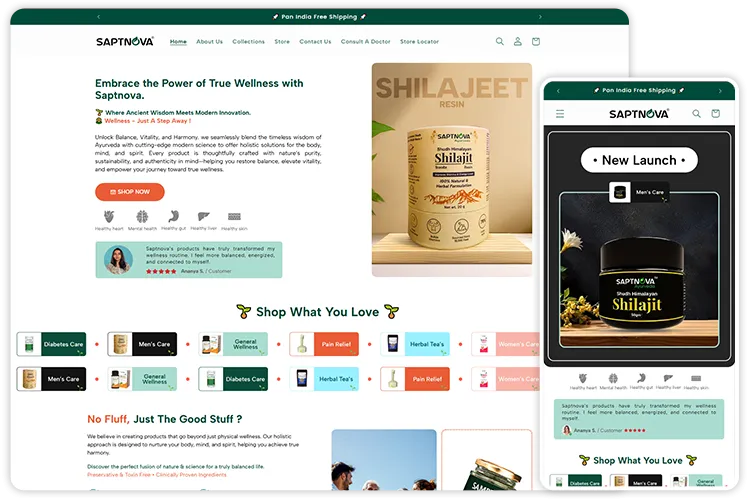
Live storefront shown
SAPTNOVA
An Ayurveda products retailer that worked with us to revamp its online presence. Our team designed and developed a custom Shopify website for the brand.
- SAM scope
- Store design · Shopify development


SAM Web Studio · Ecommerce Website Design Services
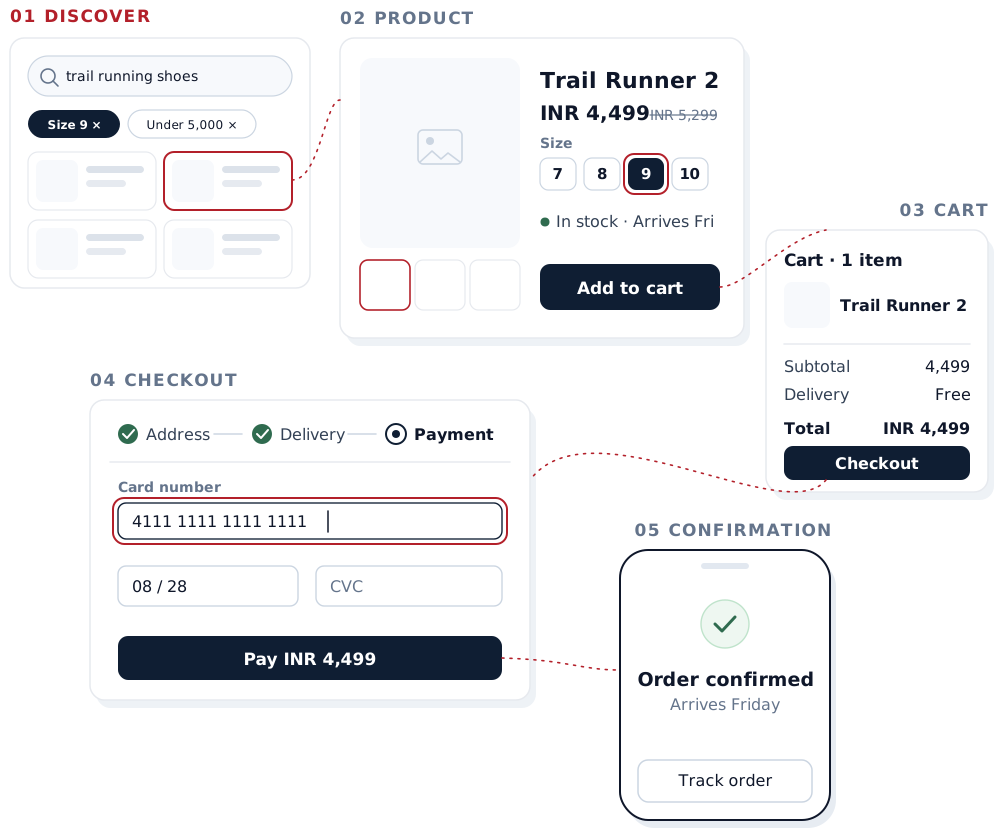
We design ecommerce journeys around how people actually shop, from finding and comparing products to cart, checkout and order confirmation. The result is a clear, responsive store structure that shoppers can use with confidence and that developers can build without guesswork.
Rated by clients
4.3–5.0across 6 review platforms


Most stores do not lose sales because they look dated. They lose them at specific points where a shopper cannot find, compare, trust or finish.
Design work on a store starts by finding which of these are costing you orders, then fixing them in the order that matters most.
People arrive at a store in different states of mind, and each needs a different route through it.
We map these journeys for your catalogue and your customers before designing layouts, because the right structure for a store with forty products is very different from one with forty thousand. Business-to-business ordering adds its own needs: bulk quantities, account pricing and repeat orders.
The catalogue structure decides how the whole store behaves: which categories exist, how deep they go, which product attributes become filters, and how one product can appear in several places without creating duplicate pages. When this is right, navigation, search and filtering become simpler to design, and the store is easier for search engines to understand; Google’s ecommerce guidance covers the same structural questions from the search side.
Shoppers find products by browsing, searching and filtering, and most use more than one of these in a single visit.
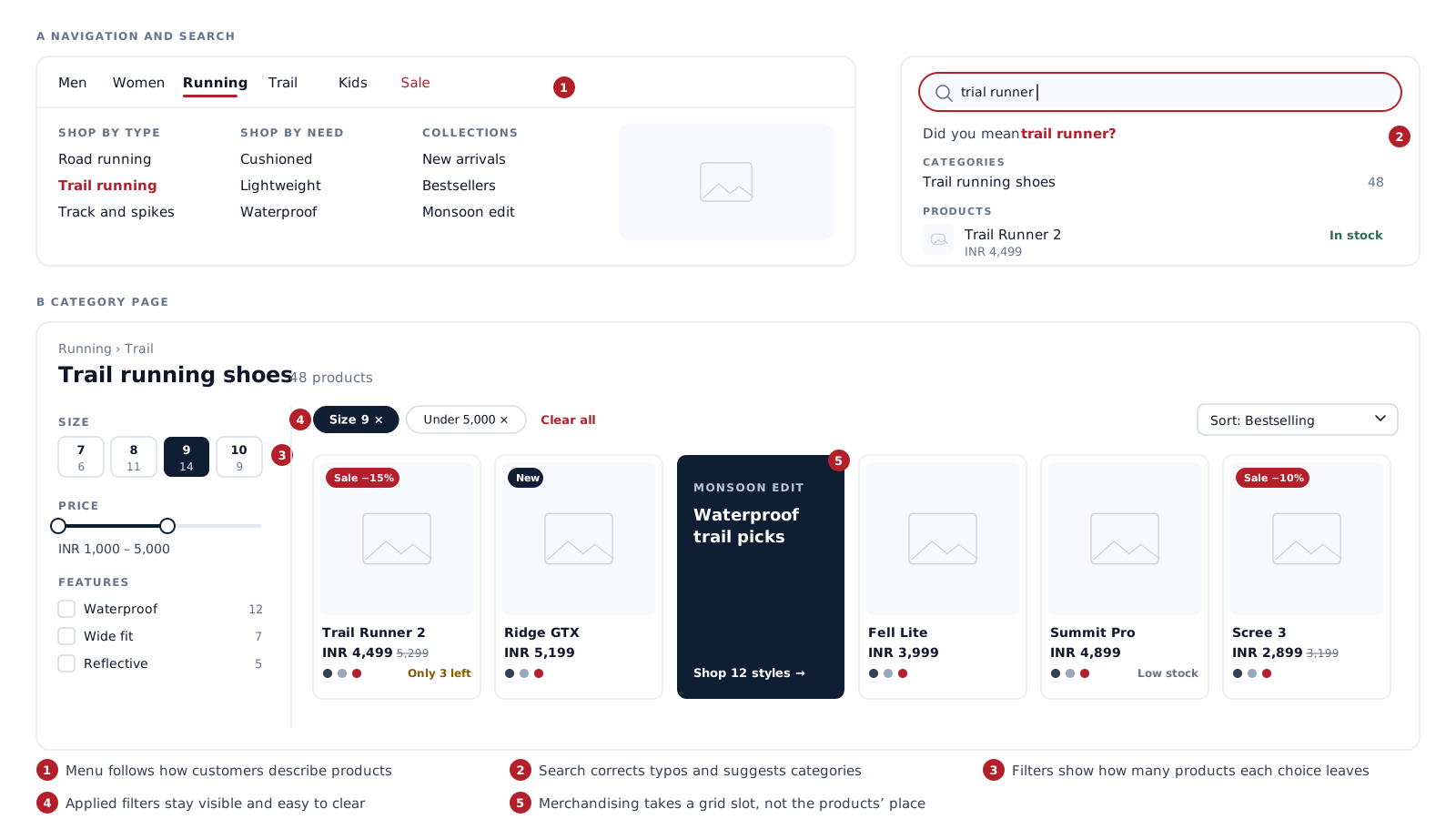
We design the main navigation around the words customers use for your products, category and collection pages that show enough on each card to compare without opening every product, and search that copes with misspellings and synonyms and still offers a useful next step when nothing matches.
Filters should match the attributes people actually choose by — size, fit, material, compatibility, price — and show how many products each choice leaves. Applied filters stay visible and easy to remove, and sorting options follow how the catalogue is really browsed.
Category pages are also where the business decides what to promote: new arrivals, bestsellers, offers and collections. We design merchandising slots, badges and product-card hierarchy so promotion helps shoppers instead of pushing the products they came for out of view.
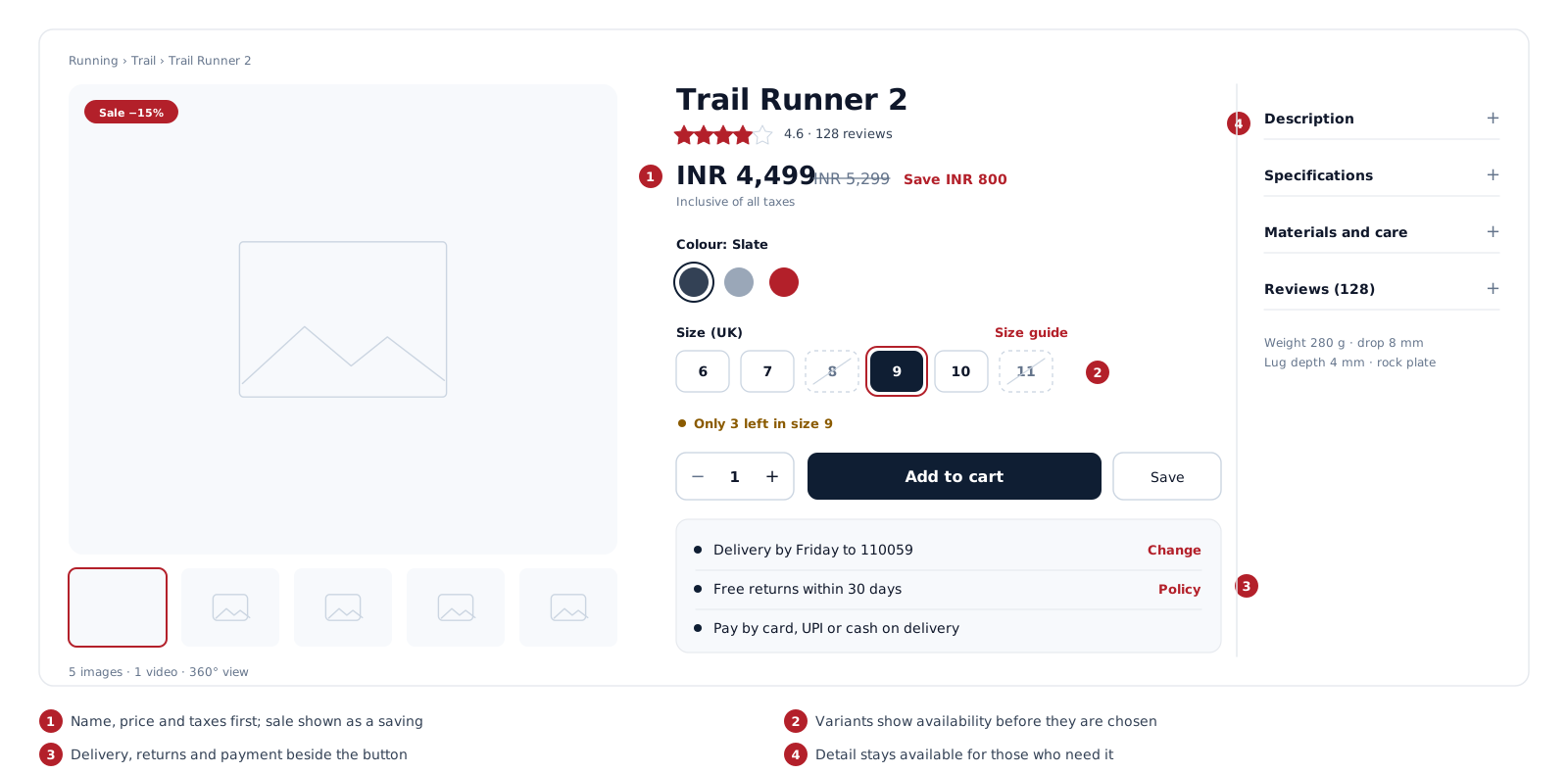
A product page has to answer every question that stops someone buying, usually within a few seconds and often on a phone.
We design the page around a clear order of information:
Price presentation covers sale and original prices, unit prices, taxes and any bundle or quantity pricing, so nothing changes unexpectedly in the cart. Out-of-stock and pre-order states are designed as well, with a clear next step instead of a dead end.
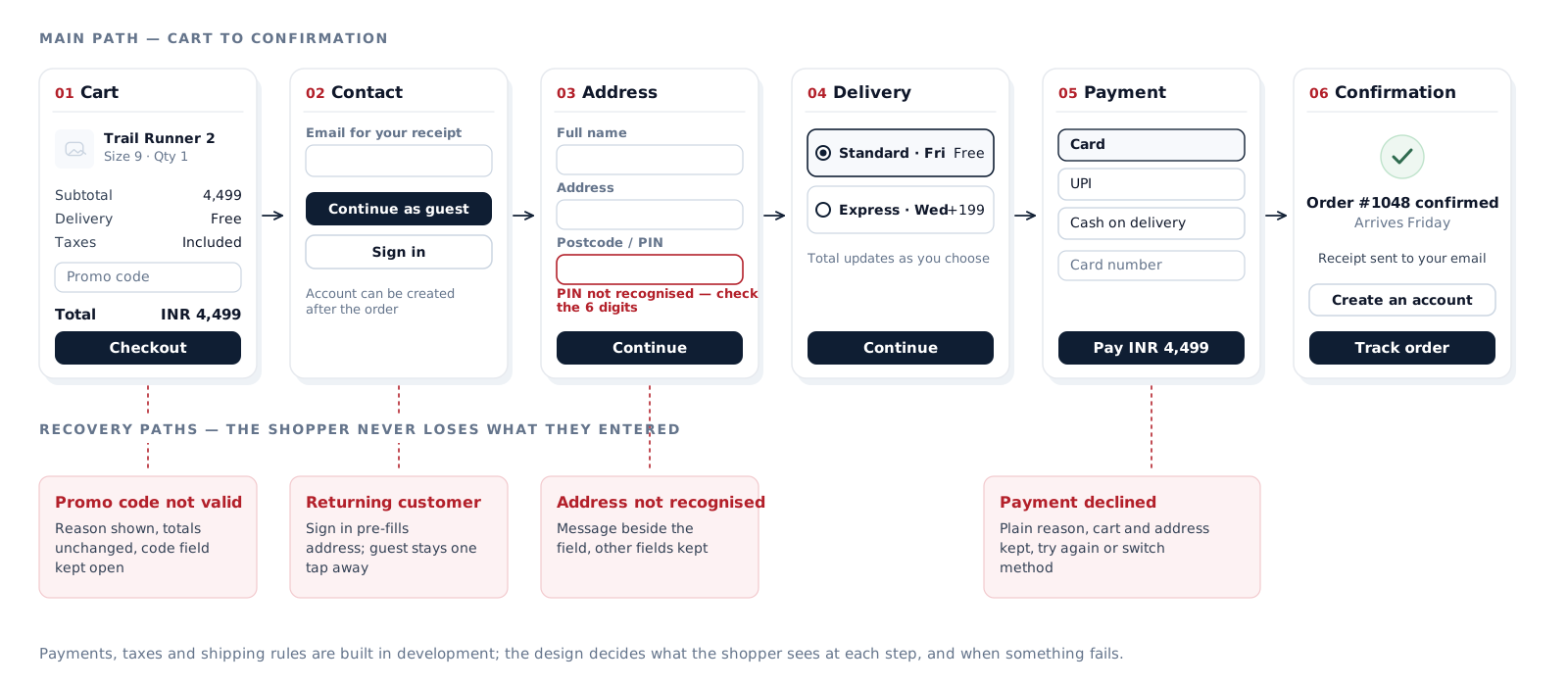
Checkout is where interest becomes an order, and where unexpected costs, forced account creation and long forms lose people who had already decided to buy.
We design this stage in detail rather than leaving it to a platform default, using independent research such as Baymard Institute’s cart and checkout usability research alongside your own analytics. The design covers:
Payment methods, tax rules and shipping logic are built in development. The design decides how they are presented, and what the shopper sees when something fails.
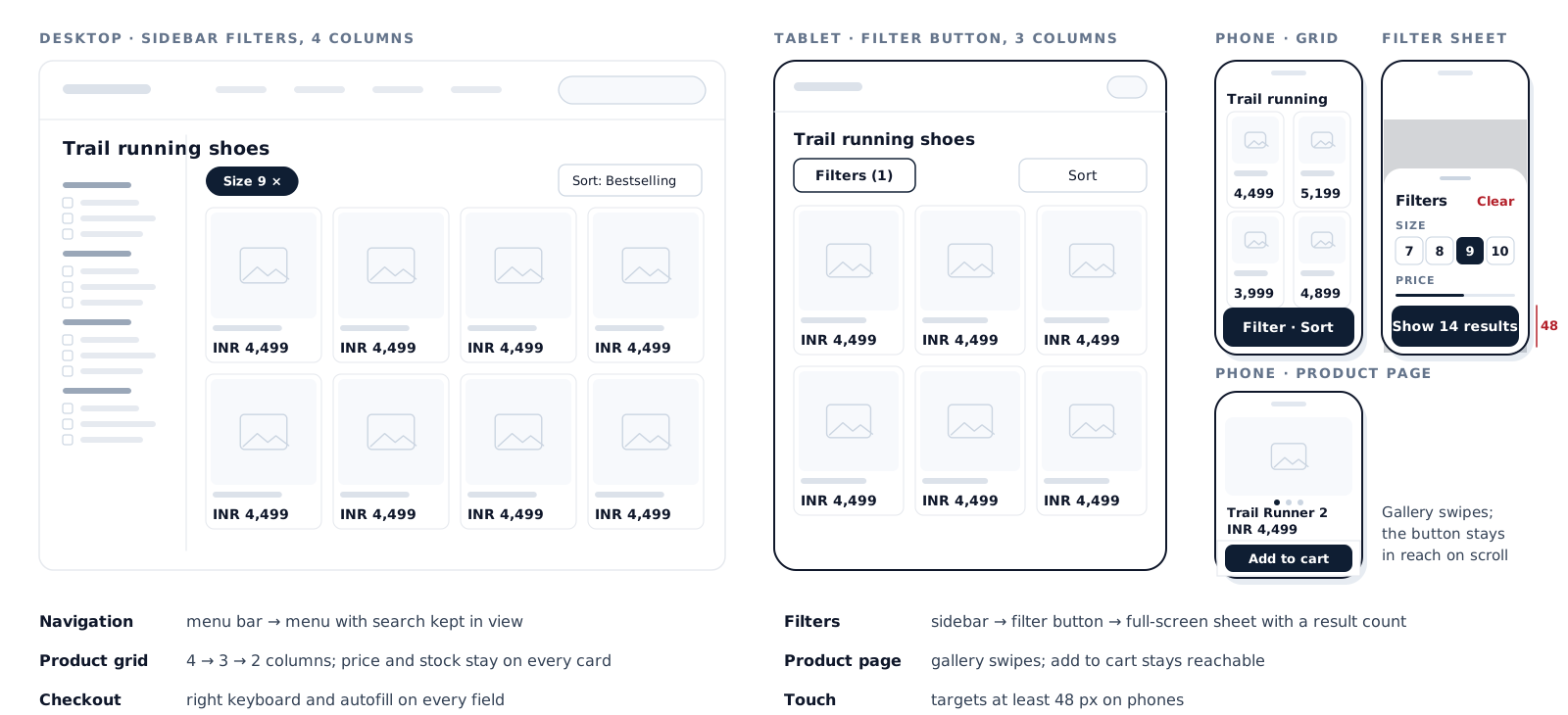
For many stores, most visits come from phones, so the phone layout is designed as a version of the store in its own right, not a compressed desktop.
Every key template — home, category, search results, product, cart and checkout — is reviewed at phone, tablet and desktop widths before handoff.
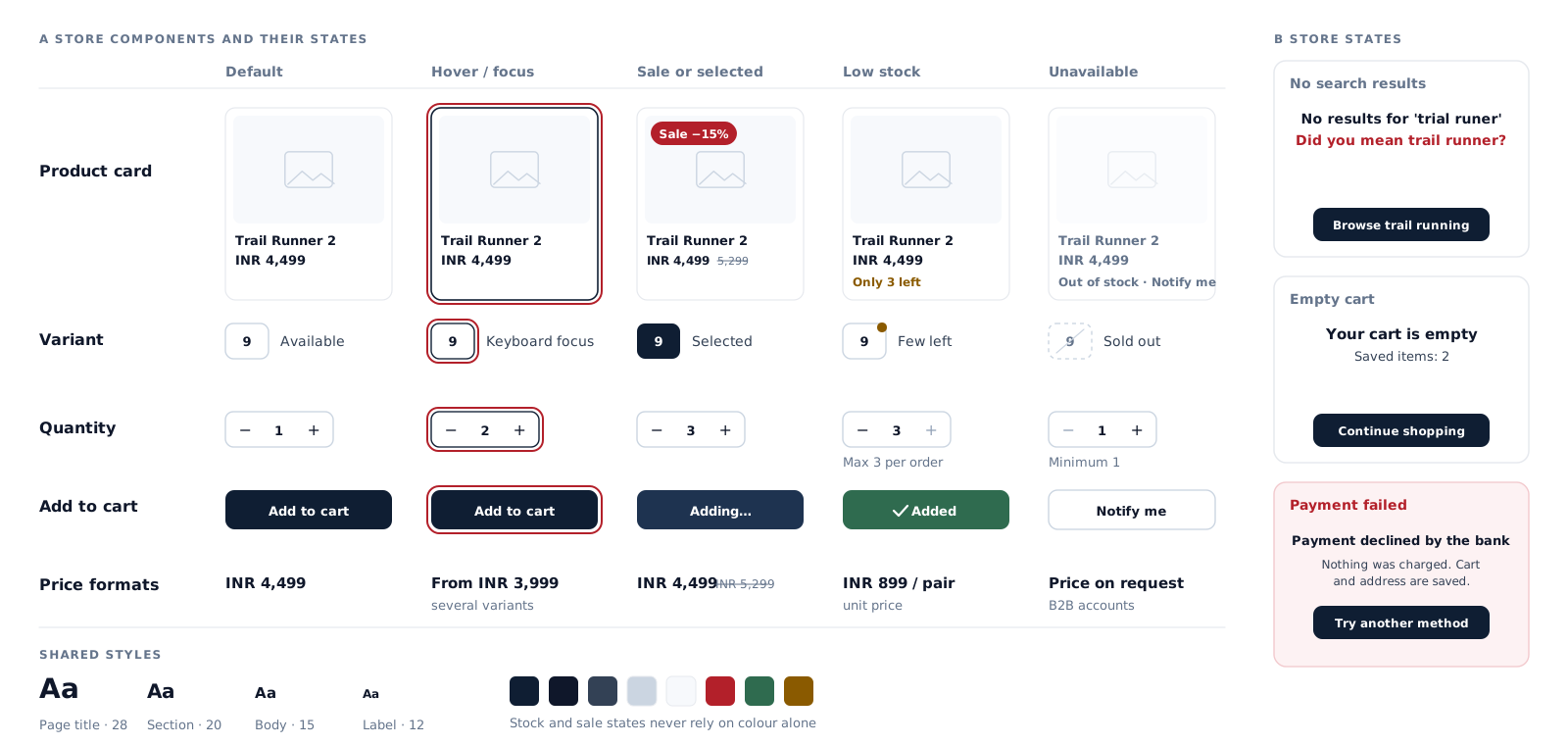
A store is built from repeating parts, and each part has states that shoppers will meet.
We define product cards, price formats, badges, variant selectors, quantity steppers, filter controls, buttons, form fields and alerts as one component set, together with their states: in stock, low stock, sold out, on sale, loading, no search results, empty cart, errors and confirmation. New pages then stay consistent, and developers build each part once.
We design for keyboard use, visible focus, sufficient contrast, labelled form fields and stock or sale information that does not rely on colour alone, following WCAG 2.2. Accessibility also depends on how the store is built and tested, so design is one part of meeting it.
Live storefront shown
An Ayurveda products retailer that worked with us to revamp its online presence. Our team designed and developed a custom Shopify website for the brand.
Your products, customers, channels and what is not working now.
Where shoppers drop off, from your data and a walkthrough of the current store.
Categories, attributes, filters and navigation.
From landing to order, for each main type of shopper.
Category, product, cart and checkout layouts where structure needs agreeing first.
The store’s look, applied to the key templates.
Product cards, variants, forms and every state they can be in.
Phone, tablet and desktop for each template.
A click-through of the buying journey with your team.
Specifications for developers, and the build checked against the design.
Not every project needs every step.
Where we also build the store, the designs move straight into development with the same components. Where another team or platform partner builds it, the handoff is prepared so nothing has to be guessed.
Depending on scope:
For an existing store, a design audit with prioritised recommendations can come first. A complete rebuild of the look and structure is scoped as a website redesign.
The two are planned together, but they answer different questions.
Decides what shoppers see and how they move through the store: catalogue structure, navigation, category and product pages, cart and checkout, on every screen size.
Structure · templates · journeys · components · states
Builds how the store works: the platform, product data, payments, shipping and tax rules, integrations and performance.
Platform · integrations · payments · orders
Stores on Shopify follow the same split: we design the store, and theme and app work is carried out by our Shopify developers.
Design services
Building the store
It covers catalogue structure and navigation, category and collection pages, search and filters, product pages, cart and checkout, phone and tablet layouts, a component set with its states, and a handoff for development. The exact scope depends on whether you are launching a new store or improving an existing one.
Design decides what shoppers see and how they move through the store. Development builds how it works: the platform, product data, payments, shipping, integrations and performance. We plan both together, and can also deliver the design on its own for another team to build.
Yes. The design work is about your catalogue and your customers rather than the platform. Where the store runs on Shopify or another platform, we design within its template structure so the result can be built without working against it.
Often, yes. A design audit shows where shoppers struggle — navigation, filters, product pages or checkout — and many fixes can be made one template at a time. A full redesign is only worth it when the structure itself is the problem.
Every template is designed for phone, tablet and desktop. On phones we rethink navigation, filters, product galleries and checkout rather than shrinking the desktop layout.
Design affects how clearly your catalogue is structured, which helps search engines understand it, but rankings depend on many factors outside design. We give category and product templates a clear place for content, product information and internal links; search optimisation itself is a separate service.
Depending on scope: catalogue structure, key shopping journeys, wireframes where needed, designed templates for every key page, responsive layouts, a component set with its states, interaction notes, assets and specifications, and design QA against the build if it is included.
The size and complexity of the catalogue, the number of templates, how many types of shopper and journey need designing, business-to-business or multi-region requirements, and whether the work starts from an existing store or from scratch. We confirm the scope after an initial review.
Start a project
Send us your store link or your plans for a new one, and tell us where you think shoppers drop off. We will tell you where design work should start and what it would involve.
We reply the same working day.


