

SAM Web Studio · Hire Next.js Developers
Hire Next.js Developers for Your Web Application
Next.js sits where front end, rendering and data meet: which pages render on the server, which are built ahead of time, how data is fetched and cached, and how fast the result feels to a visitor. If your team owns a Next.js product and needs more implementation capacity, we can review what you need and propose a developer from our team to work from your backlog, engaged through SAM Web Studio.
- Pages & Routes
- React Components
- Data from APIs & CMS
- Metadata & Structured Data
- Rendering & Hydration Fixes

Rated by clients
4.3–5.0across 6 review platforms






When a Next.js developer helps
A dedicated Next.js developer suits teams with a React product that needs steady feature work, a marketing or content site on Next.js that changes often, or an application where rendering, caching and performance have become specialist concerns. It also helps when a backend team needs someone to turn APIs into a finished interface, or when a Next.js app has lost the developer who understood it.
What they work on
Typical work includes pages, layouts and routes; reusable React components; forms and client-side interactions; data fetching from your APIs or CMS; authentication flows inside the app; image, font and script handling; metadata and structured data; route handlers or server actions where the application uses them; and fixes for rendering, hydration and bundle problems.
App Router, Pages Router and the version you are on
Next.js projects look different depending on when they started. Older applications use the Pages Router, newer ones the App Router, and many are part-way between. Data fetching, rendering and caching work differently across the two routers and across major versions, so work happens within the router and version your application actually uses rather than assuming every feature applies everywhere. Moving from one to the other is not automatically necessary; when it makes sense, it is planned in stages — routes, data fetching, caching behaviour and regression checks — and agreed as its own piece of work, as are major version upgrades.

Rendering and caching decisions
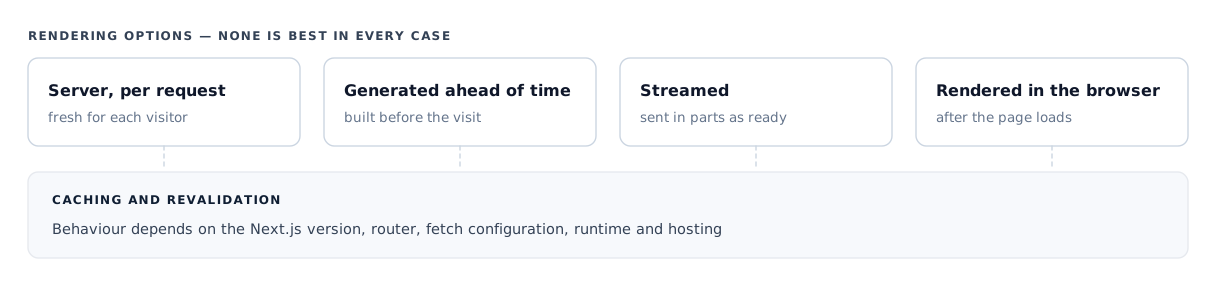
Pages can be rendered on the server per request, generated ahead of time, streamed, or rendered in the browser, and the right choice depends on how fresh the data must be, who is looking at it and how it is cached. None of these is best in every case. In App Router projects, server components keep much of the work off the browser, while client components handle interaction; the aim is to use client-side code where interaction needs it and avoid shipping JavaScript the page does not need. Caching and revalidation behaviour depends on the version, router, fetch configuration, runtime and hosting setup, which is why stale-content and "why didn't this update?" problems are common — and why they are worth someone who knows where to look.
Content from a CMS or API
Many Next.js sites pull content from a headless CMS or an existing backend. Page templates and data fetching are built around that content, with preview modes, missing or incomplete content handled gracefully, and rendering and revalidation set up so editors see changes when they expect to. We will confirm fit for your specific CMS rather than claim experience with every platform.
Components and design implementation
Consistent products are assembled from reusable components rather than one-off pages. The developer implements components that follow your design system and approved designs, so designers see their decisions carried through accurately. Designing the interface, wireframing, visual identity and design-system strategy are not part of this role; if you need that capacity too, see hiring UI/UX designers.
Forms, sign-in and user data
Forms that validate clearly, sign-in flows that handle sessions properly, and pages that load user-specific data without briefly showing the wrong content are common sources of subtle bugs. These are handled carefully within the app, with sensitive logic kept on the server rather than in code sent to the browser.
Designing identity architecture, single sign-on or security audits are separate pieces of work.
Performance
Next.js is often chosen for speed, but fast pages are not automatic. Heavy client bundles, unoptimised images and fonts, third-party scripts, slow APIs and unnecessary client-side rendering are the usual causes of slow pages and poor Core Web Vitals. The developer can identify and reduce these causes in the application — using the framework's image and font handling, loading non-essential scripts later and keeping an eye on bundle size as features are added — but results depend on the whole page, including third-party tools and the systems behind it, so no score is promised.
Search implementation, not search strategy
Next.js can support technically sound SEO: crawlable rendering, titles and descriptions, canonical tags, social preview metadata and structured data. These are implemented per page type as your SEO owner specifies. Structured data helps search engines understand a page but does not guarantee rich results or rankings, and keyword strategy, content and link building belong to SEO rather than to this role.
Accessibility
Accessible interfaces use proper headings, labelled controls, keyboard navigation and sufficient contrast. These are easier to build in than to retrofit, so they are part of normal component work.
Formal accessibility audits and conformance testing are separate pieces of work.
Joining an existing Next.js app
Onboarding starts with the version and router in use, the project structure, how data is fetched and cached, environment configuration, the CMS and API dependencies, the authentication setup and how the app is built and deployed. A first contained change — a page, a component or a known rendering bug — confirms the local setup and conventions before larger work. How long this takes depends on the size and state of the application.
Where the Next.js role stops
The developer works on the Next.js application itself, including its route handlers and server-side code. Larger backend platforms, domain APIs and background processing usually sit better with a Node.js, NestJS or Laravel developer.
Work happens within your existing build and deployment process and app-level configuration.
Separate unless agreed
- Server provisioning
- Cloud and CDN architecture
- CI/CD pipelines
- Container orchestration
- Infrastructure monitoring
- Independent QA
- Project management
Hosting work is covered by our hosting and infrastructure service or your own operations team.
Developer or Next.js project?
If you want SAM to own the delivery of a Next.js application — architecture, build and launch — rather than add a developer to your team, see our Next.js development service. A dedicated developer suits continuing work that your team directs.
Hire a Next.js developer
Hire a developer for continuing work your team directs.
Next.js development service
Use the service when you want SAM to own delivery.
Related
- Hire Dedicated ResourcesOther specialists, and how a dedicated engagement works.
- Next.js DevelopmentA Next.js application with SAM responsible for delivery.
- Hire UI/UX DesignersDesign capacity for the interfaces a developer builds.
Next.js work we have delivered
Our Next.js experience includes the Blu Resorts multi-hotel website, a Next.js application with a separate API and database, and our group agency site. These were project builds, not dedicated-resource placements; they show the Next.js work our team understands but do not by themselves mean a particular developer is free on a given date.

Next.js · Project build
Blu Resorts
The screenshot shows the Blu Resorts multi-hotel website, a Next.js application with a separate API and database built by our team as a project.
Also on Next.js Our group agency site
Hire Next.js Developers FAQs
Hire Next.js Developers
Need Next.js capacity?
Tell us which Next.js version and router your application uses, and what is next on the roadmap. We will review the requirement, confirm suitable availability and explain how the engagement could work.


